Showing posts with label working. Show all posts
Showing posts with label working. Show all posts
Wednesday, November 19, 2014
Nokia N97 Send End and Menu Keys Not Working Solution
Heres the solution for Nokia N97 Send, End and Menu button keys not responding problem. This solution may possibly help fix and solved if the upper keypad keys stop working.
After ensuring that the upper keypad flex is okay but still the Send, End and Menu keys wont work you may then use and apply this solution below.

The above solution shows the connection of the upper keypad keys line paths from the pin con connector through to the EMI-ESD filter chip. This filter IC also shared and being used for the camera module. So if both camera and and the upper keys are not working you may suspect that this chip is faulty or already damaged.
If the flex cable is okay and or already tried replacing a new one but the problem still exist, you may then check and replace the EMI-ESD filter IC. And dont forget to ensure that the pin connector is perfectly clean.
After ensuring that the upper keypad flex is okay but still the Send, End and Menu keys wont work you may then use and apply this solution below.
Nokia N97 SEND, END and MENU keypad keys failure Solution

The above solution shows the connection of the upper keypad keys line paths from the pin con connector through to the EMI-ESD filter chip. This filter IC also shared and being used for the camera module. So if both camera and and the upper keys are not working you may suspect that this chip is faulty or already damaged.
If the flex cable is okay and or already tried replacing a new one but the problem still exist, you may then check and replace the EMI-ESD filter IC. And dont forget to ensure that the pin connector is perfectly clean.

Tuesday, November 18, 2014
Nokia N78 left and right ringer hands free speaker not working solution
Heres a solution for nokia N78 ringer and hands free speaker not working or no sounds can be heard on it. This solution shows the left and right speaker circuit components connections.
 There is an audio amplifier IC that drives and boosts the audio signals before it goes trough to the left and right speakers. The audio data signal is filtered by filter coils and an input capacitors.Repair hints:
1. Check and ensure that the speaker is working okay, a saturated sound output is caused by a damaged speaker, replace it with a new one.
2. Clean the speaker terminal contact pads, make sure it is free from dust, corrosion and oxidation.
3. Check or replace the filter capacitors and filter coils.
4. For the right channel speaker not working, see to it that UI flex cable is not damaged, replace it as well if damaged. If the UI flex cable is okay, check both filter coils and capacitors.
5. If the both speakers,filter coils and capacitors is okay, try to rework the audio amplifier IC or replace if the problem still exists. Dont forget to rest assured that the line connection paths is well okay and not open or cut, check and trace it as well also. Good luck!
Nokia N78 Ringer and Hands Free speaker No audio sounds solution

1. Check and ensure that the speaker is working okay, a saturated sound output is caused by a damaged speaker, replace it with a new one.
2. Clean the speaker terminal contact pads, make sure it is free from dust, corrosion and oxidation.
3. Check or replace the filter capacitors and filter coils.
4. For the right channel speaker not working, see to it that UI flex cable is not damaged, replace it as well if damaged. If the UI flex cable is okay, check both filter coils and capacitors.
5. If the both speakers,filter coils and capacitors is okay, try to rework the audio amplifier IC or replace if the problem still exists. Dont forget to rest assured that the line connection paths is well okay and not open or cut, check and trace it as well also. Good luck!
Friday, November 14, 2014
Sony Ericsson K750 Camera Problem

Camera Operation Failed Camera On Standby Camera Not Working
Wednesday, November 12, 2014

Tuesday, November 11, 2014

Saturday, November 8, 2014
Nokia 5233 mic not working problem solution jumper ways
if mic is not working in Nokia 5233 our voice can not be reached to destination mobile during voice call and we can not record audio recording in it.to solve this mic problem in Nokia 5233 you can follow a few steps as given in post bellow.

in above diagram there are some different color lines which are to define tracks of mic and parts that are used in it.check these path with meter and if any of them is missing then apply jumpers as shown in above diagram.
if any part is missing or damage replace those parts with new that you can get from other mobile boards.
for more detail and new tips and tricks about cellphone service problem keep visiting this page we will update daily this blog timely with other mobile solution.
Read More..

in above diagram there are some different color lines which are to define tracks of mic and parts that are used in it.check these path with meter and if any of them is missing then apply jumpers as shown in above diagram.
if any part is missing or damage replace those parts with new that you can get from other mobile boards.
for more detail and new tips and tricks about cellphone service problem keep visiting this page we will update daily this blog timely with other mobile solution.
Thursday, November 6, 2014
Nokia x3 keypad light ok Lcd light not working Problem Solution Tested
If Nokia X3 keypad light is working but lcd light is not working this problem can be solved with a few jumpers that you can find in bellow diagram.So in first step check lcd jack and lcd.

if lcd jack is fine and there is no damages or rust on it you can check with new lcd. If new lcd shows same result apply jumpers as given above diagram it will help you to solve Nokia x3 lcd light problem while keypad light already lighting.
for more detail and new tips and tricks about cellphone service problem keep visiting this page we will update daily this blog timely with other mobile solution.
if lcd jack is fine and there is no damages or rust on it you can check with new lcd. If new lcd shows same result apply jumpers as given above diagram it will help you to solve Nokia x3 lcd light problem while keypad light already lighting.
for more detail and new tips and tricks about cellphone service problem keep visiting this page we will update daily this blog timely with other mobile solution.
Nokia C2 01 power button On Off switch not working ways jumpers
If Nokia C2-01 is not getting power On and it can make charging. It is 100% fault of on off button in it.because On Off button on keypad is not working so that it will not be able to power On.All cellular mobile repair solution Nokia 2320 Classic Camera Problem Solution Jumpers Ways
Nokia C2-01 power button On Off switch not working ways jumpers.Replace battery and check if mobile can not be switch On dis assemble the phone and check power switch button ways as given in above diagram.If any print out of these is missing apply jumpers to solve On Off Button problem in Nokia C2-01 .
for more detail and new tips and tricks about cellphone service problem keep visiting this page we will update daily this blog timely with other mobile solution.
Nokia C2-01 power button On Off switch not working ways jumpers.Replace battery and check if mobile can not be switch On dis assemble the phone and check power switch button ways as given in above diagram.If any print out of these is missing apply jumpers to solve On Off Button problem in Nokia C2-01 .
for more detail and new tips and tricks about cellphone service problem keep visiting this page we will update daily this blog timely with other mobile solution.
Wednesday, November 5, 2014
Nokia Asha 311 Volume and Lock Keys Not working Jumpers
 Nokia Asha 311 Volume and Keypad lock keys problem can be solve with a few steps and jumpers that i am going to teach in this post and given in diagram bellow.So following these tips and tricks we can solve volume and keypad lock key lock keys easily.
 If volumes are not working we will not be able to volume up or down we also can not use keypad if keypad lock button is not working in Nokia Asha 311.So look at above diagram and clean all these parts that are given in it.
Apply heat to so that it can be dry for a few mint.Do not apply much heat because it can harm your skin and may can damage mother board also.
Check all these tracks that are given in repairing diagram and if any of them is missing apply jumpers as shown in it.If any button switch or part is damage you can replace it with new one.
Nokia C2 01 Speaker Ear piece is not working problem solution
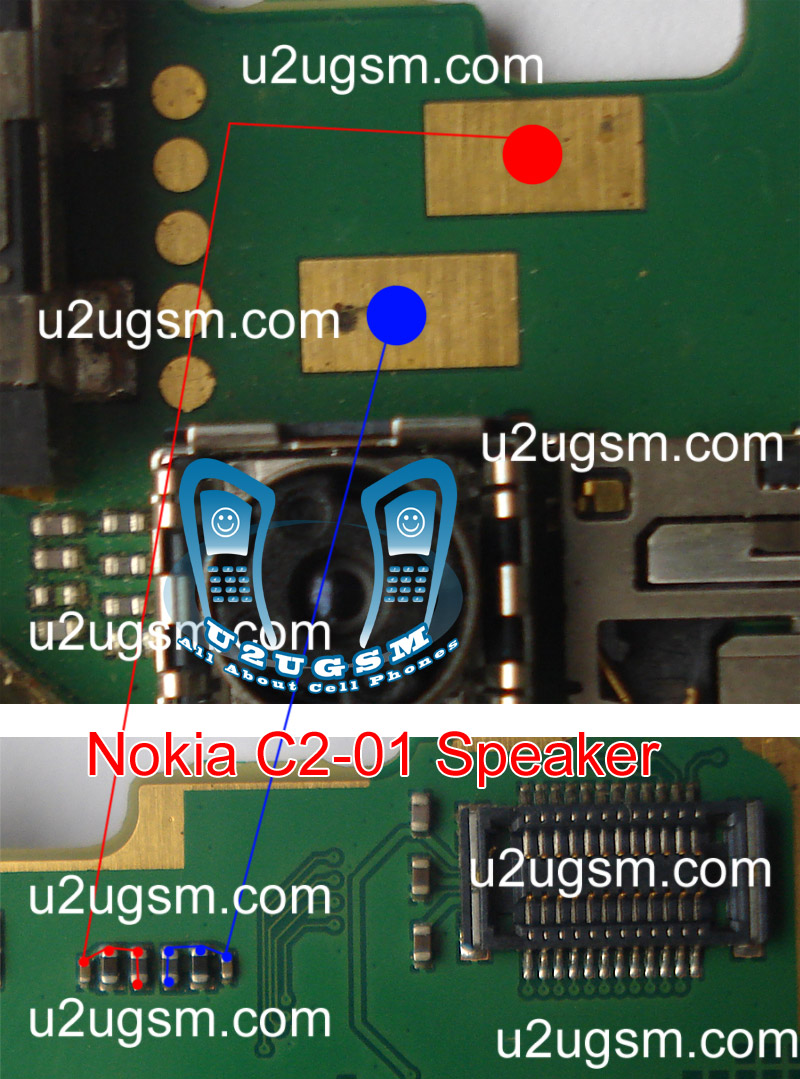
This post is about to solve speaker problem in Nokia C2-01 in a few easy steps. 
Speaker can be damage and it may have noise in voice and in some cases it can be low voice quality in it.So in all these problems about speaker of Nokia C2-01 replace speaker after dis assembly of Nokia C2-01.
If replacement of speaker could not solve problem check all these tracks that are given in above diagram to solve ear piece problem.If any print out of these is missing apply jumpers and if any part is missing or damage replace them.
Speaker can be damage and it may have noise in voice and in some cases it can be low voice quality in it.So in all these problems about speaker of Nokia C2-01 replace speaker after dis assembly of Nokia C2-01.
If replacement of speaker could not solve problem check all these tracks that are given in above diagram to solve ear piece problem.If any print out of these is missing apply jumpers and if any part is missing or damage replace them.
Friday, October 31, 2014
Nokia 2320 keypad is not working it can be cause of water damage or broken parts In this problem
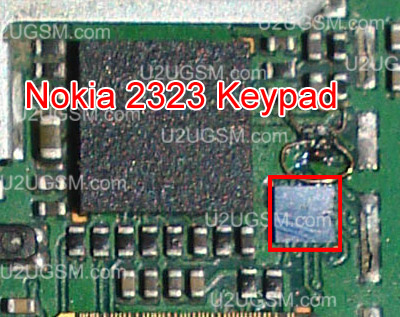
If Nokia 2320 keypad is not working it can be cause of water damage or broken parts.In this problem whole keypad or a set of keys will not work.Nokia E52 Handfree IC Not working headset problem solution

So to solve keypad problem, Keypad not working problem solution check this ic which is used as keys controller.Re sold this ic or re flow this keypad ic. If resolding of keypad ic can not solve keypad problem you have to replace it or short with jumpers.
for more detail and new tips and tricks about cellphone service problem keep visiting this page we will update cellphone service diagrams timely with new cellphone diagrams.some related post are also given bellow you can read them also for more information about cellphone
So to solve keypad problem, Keypad not working problem solution check this ic which is used as keys controller.Re sold this ic or re flow this keypad ic. If resolding of keypad ic can not solve keypad problem you have to replace it or short with jumpers.
for more detail and new tips and tricks about cellphone service problem keep visiting this page we will update cellphone service diagrams timely with new cellphone diagrams.some related post are also given bellow you can read them also for more information about cellphone
Tuesday, October 28, 2014
Nokia C5 00 Handfree IC Not working problem solution with jumpers
If you find a handfree problem in Nokia C5-00. Hand free open Handfree not dected problem it can be solve with a few easy steps that i will write in this post. A handfree repairing diagram is also attached with this post that will show you the main parts that are used in handfree function in Nokia C5-00.

So once you have review the repairing diagram for Nokia C5-00 clean handfree jack and these parts that are identified in above diagram. Clean them with electronics cleaner and apply heat to dry the mother board.Do not apply much hot air because it can harm you skin and may can damage the mother board.
Remove the ic and apply jumpers as shown in section one of the diagram Then change the second part which is given in repairing diagram for handfree problem in Nokia c5-00.
for more detail and new tips and tricks about cellphone service problem keep visiting this page we will update cellphone service diagrams timely with new cellphone diagrams.some related post are also given bellow you can read them also for more information about cellphone.
So once you have review the repairing diagram for Nokia C5-00 clean handfree jack and these parts that are identified in above diagram. Clean them with electronics cleaner and apply heat to dry the mother board.Do not apply much hot air because it can harm you skin and may can damage the mother board.
Remove the ic and apply jumpers as shown in section one of the diagram Then change the second part which is given in repairing diagram for handfree problem in Nokia c5-00.
for more detail and new tips and tricks about cellphone service problem keep visiting this page we will update cellphone service diagrams timely with new cellphone diagrams.some related post are also given bellow you can read them also for more information about cellphone.
Sunday, October 26, 2014
Nokia 1800 and Nokia 1616 Power ON OFF switch Key Line paths for Nokia working solution
Heres the solution to repair Nokia 1616 and Nokia 1800 power ON/OFF switch problem.
This problem may cause the device unable to power up when hitting the power key. The problem may easily configured if the power ON and OFF switch key has no response, but the device is not totally dead for it shows a charging indication when you charge it up. Now, this solution simply shows the line paths (ON OFF ways)of the power key.![nokia]() Hints for repair: when the device will unable to power up when hitting the power key button but it shows charging indication when you plug-in the battery charger, the problem may possibly lies on the power key line paths. But before tracing the line paths, you must see to it that the keypad membrane is perfectly clean and free from dirt, corrosion and oxidation.
Hints for repair: when the device will unable to power up when hitting the power key button but it shows charging indication when you plug-in the battery charger, the problem may possibly lies on the power key line paths. But before tracing the line paths, you must see to it that the keypad membrane is perfectly clean and free from dirt, corrosion and oxidation.
You can check the power ON/OFF voltage to the inner core of the switch key terminal pads, this voltage may range approximately from 1to 3 volts. If there is no voltage reading you get on that spot, locate and trace the test spots for the power switch, see the picture guide above, it is located just near the keypad LED. Make a continuity check by using a multimeter to those corresponding spots indicated on the picture guide, from the power key pads through to each corresponding component. The outer core is connected to a chip capacitor located near the clock crystal oscillator.
This problem may cause the device unable to power up when hitting the power key. The problem may easily configured if the power ON and OFF switch key has no response, but the device is not totally dead for it shows a charging indication when you charge it up. Now, this solution simply shows the line paths (ON OFF ways)of the power key.
Nokia 1616, 1800 Power ON OFF switch Line Paths (ON and OFF ways)
You can check the power ON/OFF voltage to the inner core of the switch key terminal pads, this voltage may range approximately from 1to 3 volts. If there is no voltage reading you get on that spot, locate and trace the test spots for the power switch, see the picture guide above, it is located just near the keypad LED. Make a continuity check by using a multimeter to those corresponding spots indicated on the picture guide, from the power key pads through to each corresponding component. The outer core is connected to a chip capacitor located near the clock crystal oscillator.
Thursday, October 23, 2014
Blackberry 9500 cellular phone Keypad not working solution
blackberry 9500 cellular phone Keypad not working solution,blackberry 9500 cellular phone keypad solution,blackberry 9500 cellular phone Keypad solution without ic 100% tested solution,blackberry 9500 keypad problem jumper solution ,blackberry 9500 keypad any key not working solution, blackberry 9500 full key not working any key solution,if u have blackberry 9500 cellular phone any kay not working full phone hang after on i have this problem 100% tested solution 1st try to wash full boot 2nd try flash your phone for good firmware i hope done not done try this diagram and see this 1st reheat i think done not done try to change this ic 100% done many time tested working this ic and 100% done phone blackberry 9500
blackberry 9105 cellular phone mmc not work repair solution

see and try your phone blackberry 9500 keypad solution 1005 tested and dont forget visit my blog.
Wednesday, October 22, 2014
I Phone 5 Home Button Not Working Ways Solution
I phone 5 home button not working ways solution,if u have i phone 5 and this phone problem home button not working this problem solution very easy way i have this problem 100% solution this problem working tested me many time see this home button not working tips and tricks repair guide see this enjoy it I Phone 5 Handsfree Problem Not Working Solution

see this diagram and working step by step i think solved your problem 100% this solution working many time .i phone 5 home button not working only jumper done solution without ic only jumper done home button not working solution.
Wednesday, September 24, 2014
Nokia N70 N72 low battery early discharge battery solution 100 working

Sunday, September 14, 2014

Thursday, September 11, 2014
Tuesday, September 2, 2014
Samsung S3350 Ch t 335 Cellular Phone Keypad light No Working fix problem

Subscribe to:
Posts (Atom)
