Showing posts with label problem. Show all posts
Showing posts with label problem. Show all posts
Thursday, December 11, 2014
Nokia E51 Mic Problem Jumper Ways Solution

Nokia E51 Mic Problem Jumper Ways Solution
Nokia E51 Mic Problem Jumper Ways Solution
Nokia E51 Mic Not Working Problem Solution

Sunday, December 7, 2014
Nokia 6233 Memory Card MMC Corrupted Problem


- 6233 Memory Card Problem
- 6233 MMC Corrupted
- 6233 Memory Card Corrupted
- 6233 MMC Jumpers
- 6233 MMC IC Ways Bypass
Sunday, November 23, 2014
Blackberry Bold 9700 white screen problem Solution
Heres a step by step guide and a solution to fix Blackberry bold 9700 white screen problem, many users called it a White Screen of Death(WSOD. This solution may help if having a problem issue like below.

The Blackberry Bold 9700 showing a bright white screen display
Heres what your Blackberry Situation that may possibly fix this solution:
The phone hasnt been anywhere close to water and the moisture stickers are intact. Can still hear tones from incoming call or text messages.
Other than the display screen the phone is fully operational. Dm sees it perfectly, You can still do a blind-call out and receive calls. Only problem is i can only see a bright white screen.
Many sites has been suggesting a solution such as this: Battery pull, wipe, reinstall 4.6, reinstall 5, backup and restore files, clean install, battery left out for 24 hours and installed a new battery but it doesnt fix the problem.
Now, heres a solution on how to fix a a Blackberry Bold 9700 with white screen problem.
1. Reassemble the Blackberry bold 9700, only do it unless the warranty period has already expired.
Now, locate the highlighted components as shown on the image. These are the display filters. Works as electrostatic discharge (ESD) and electromagnetic Interference (EMI) filters, and once being damaged it will cause and result to a white screen, sometimes being garbled or saturated screen display.
Heres what your Blackberry Situation that may possibly fix this solution:
The phone hasnt been anywhere close to water and the moisture stickers are intact. Can still hear tones from incoming call or text messages.
Other than the display screen the phone is fully operational. Dm sees it perfectly, You can still do a blind-call out and receive calls. Only problem is i can only see a bright white screen.
Many sites has been suggesting a solution such as this: Battery pull, wipe, reinstall 4.6, reinstall 5, backup and restore files, clean install, battery left out for 24 hours and installed a new battery but it doesnt fix the problem.
Now, heres a solution on how to fix a a Blackberry Bold 9700 with white screen problem.
1. Reassemble the Blackberry bold 9700, only do it unless the warranty period has already expired.
Now, locate the highlighted components as shown on the image. These are the display filters. Works as electrostatic discharge (ESD) and electromagnetic Interference (EMI) filters, and once being damaged it will cause and result to a white screen, sometimes being garbled or saturated screen display.

Blackberry Bold Display Filters Components
Check those components and have it replaced, you may find these parts from any old Blackberry phone PCB board that are already junked. Just like the one below that taken apart from the damaged Blackberry 9100 PCB board.
Check those components and have it replaced, you may find these parts from any old Blackberry phone PCB board that are already junked. Just like the one below that taken apart from the damaged Blackberry 9100 PCB board.

Then in place it to your Blackberry bold 9700 display filters. Try replacing one by one then power it again to check, just repeat until all four filters being replace and get the screen display fix.

Thats it! all credits goes to Rievax_08 and GSM Solido for the repair tricks.
Sunday, November 16, 2014

Nokia C1 00 Insert SIM card Problem Solution


Nokia C1 00 Insert SIM card Problem Solution
Saturday, November 15, 2014
Nokia N78 Battery Charging problem solution charger not supported solution
Heres the solution that may possible fix and repair Nokia N78 Charger not supported
problem. This is caused by a damaged battery temperature resistor(BTEMP).
This resistor has a value of 47K, by replacing it might help fix the problem.

problem. This is caused by a damaged battery temperature resistor(BTEMP).
This resistor has a value of 47K, by replacing it might help fix the problem.
Nokia N78 Charger Not supported solution

N78 BTEMP Resistor location
Friday, November 14, 2014
Sony Ericsson K750 Camera Problem

Camera Operation Failed Camera On Standby Camera Not Working
Thursday, November 13, 2014
Nokia 5250 LCD Display problem Ic Solutions
White display blank display in Nokia 5250 can be due to water damage or damae of thee ic(s) in cell phone.so look at diagram bellow and be satisfide about these parts in first step.in diagram below you can see lcd display jack and display ic in red lines.

if these parts components are broken and damage then replace htem to solve display problem in nokia 5250.it will solve white display blank display problem in cell pohone.
for more detail and new tips and tricks about cellphone service problem keep visiting this page we will update daily this blog timely with other mobile solution.
Read More..
if these parts components are broken and damage then replace htem to solve display problem in nokia 5250.it will solve white display blank display problem in cell pohone.
for more detail and new tips and tricks about cellphone service problem keep visiting this page we will update daily this blog timely with other mobile solution.
Nokia 2610 2626 Not Charging Problem

2610 Charging Problem 2610 Not Charging 2610 Charger Not Supported 2626 Charging Problem 2626 Not Charging 2626 Charger Not Supported
Wednesday, November 12, 2014

Nokia 5250 Touch Screen Problem Solution Jumper Ways
this diagram is about touch Lcd problem in Nokia 5250 . In case of touch Lcd problem we can not use any key and we can not manage keypad and mobile functions.to solve touch Lcd problem in Nokia 5250 you can follow a few steps as given bellow.

after dis assambling of Nokia 5250 check touch Lcd jack on board if there is some carbon or water damage then clean it with electronics cleaner and apply a light heat with hot air so that it can be dry.once its totally dry check touch Lcd.
if touch Lcd of Nokia 5250 will not be solve with above method check all track and parts as shown in above diagram.in diagram all tracks are given with different colors and you can easily find whole track and path.
if any path is damage or broken apply jumpers as shown and replace parts as given in diagram.
for more detail and new tips and tricks about cellphone service problem keep visiting this page we will update daily this blog timely with other mobile solution.
Read More..
after dis assambling of Nokia 5250 check touch Lcd jack on board if there is some carbon or water damage then clean it with electronics cleaner and apply a light heat with hot air so that it can be dry.once its totally dry check touch Lcd.
if touch Lcd of Nokia 5250 will not be solve with above method check all track and parts as shown in above diagram.in diagram all tracks are given with different colors and you can easily find whole track and path.
if any path is damage or broken apply jumpers as shown and replace parts as given in diagram.
for more detail and new tips and tricks about cellphone service problem keep visiting this page we will update daily this blog timely with other mobile solution.
Saturday, November 8, 2014
Nokia 5233 mic not working problem solution jumper ways
if mic is not working in Nokia 5233 our voice can not be reached to destination mobile during voice call and we can not record audio recording in it.to solve this mic problem in Nokia 5233 you can follow a few steps as given in post bellow.

in above diagram there are some different color lines which are to define tracks of mic and parts that are used in it.check these path with meter and if any of them is missing then apply jumpers as shown in above diagram.
if any part is missing or damage replace those parts with new that you can get from other mobile boards.
for more detail and new tips and tricks about cellphone service problem keep visiting this page we will update daily this blog timely with other mobile solution.
Read More..

in above diagram there are some different color lines which are to define tracks of mic and parts that are used in it.check these path with meter and if any of them is missing then apply jumpers as shown in above diagram.
if any part is missing or damage replace those parts with new that you can get from other mobile boards.
for more detail and new tips and tricks about cellphone service problem keep visiting this page we will update daily this blog timely with other mobile solution.
Nokia X6 Camera Failure Problem Solution hardware repair solution
Before using or applying this solution ensure to restore,flash and update,
the device firmware on Nokia X6. Oftentimes camera failure is cause by an interrupted firmware, restoring or flashing it back again will fix the problem. But
if that does not solved the problem you may then proceed to hardware repair troubleshooting, especially
if the device suffered from wet damaged and accidentaly dropped by the user.
The problem may possibly lies on faulty hardware components.This solution below shows the main camera circuit on Nokia X6 and can be used as a guide to fix and repair camera hardware failure issues.
 Camera Repair Tips:
a) Try to replace a new camera replacement module.
b) Check and clean the camera connector.
c) Do supply voltage measurement on corresponding camera supply voltages (see solution above). You can check this voltages while trying to enable the camera in ON condition.
There are three voltage converters circuit that feeds voltage to enable the camera. This voltage ranges are as follows, 1.8volts, 2.8volts and 1.3volts DC voltages.
This voltages are converted by a DC to DC converters chip. The chips converts the Battery voltage which is 3.7 volts and drop it down or minimize it to 1.8, 2.8 and 1.3 DC voltage.
So, ensure that the battery supply voltage is properly feeds to each of the DC converter chips.
If the battery supply voltage is present and still there is no voltage output you can read on each chip, you may then check or replace the DC to DC converter ICs.
d) If all voltages reading is working good and no problems found, but the problem still exists, you may then proceed to rework or replace the Camera Accelerator IC this chip holds and control the camera data signals before it feeds to the application processor IC.
the device firmware on Nokia X6. Oftentimes camera failure is cause by an interrupted firmware, restoring or flashing it back again will fix the problem. But
if that does not solved the problem you may then proceed to hardware repair troubleshooting, especially
if the device suffered from wet damaged and accidentaly dropped by the user.
The problem may possibly lies on faulty hardware components.This solution below shows the main camera circuit on Nokia X6 and can be used as a guide to fix and repair camera hardware failure issues.
Nokia X6 Camera Hardware Problem Solution

a) Try to replace a new camera replacement module.
b) Check and clean the camera connector.
c) Do supply voltage measurement on corresponding camera supply voltages (see solution above). You can check this voltages while trying to enable the camera in ON condition.
There are three voltage converters circuit that feeds voltage to enable the camera. This voltage ranges are as follows, 1.8volts, 2.8volts and 1.3volts DC voltages.
This voltages are converted by a DC to DC converters chip. The chips converts the Battery voltage which is 3.7 volts and drop it down or minimize it to 1.8, 2.8 and 1.3 DC voltage.
So, ensure that the battery supply voltage is properly feeds to each of the DC converter chips.
If the battery supply voltage is present and still there is no voltage output you can read on each chip, you may then check or replace the DC to DC converter ICs.
d) If all voltages reading is working good and no problems found, but the problem still exists, you may then proceed to rework or replace the Camera Accelerator IC this chip holds and control the camera data signals before it feeds to the application processor IC.
Thursday, November 6, 2014
Nokia x3 keypad light ok Lcd light not working Problem Solution Tested
If Nokia X3 keypad light is working but lcd light is not working this problem can be solved with a few jumpers that you can find in bellow diagram.So in first step check lcd jack and lcd.

if lcd jack is fine and there is no damages or rust on it you can check with new lcd. If new lcd shows same result apply jumpers as given above diagram it will help you to solve Nokia x3 lcd light problem while keypad light already lighting.
for more detail and new tips and tricks about cellphone service problem keep visiting this page we will update daily this blog timely with other mobile solution.
if lcd jack is fine and there is no damages or rust on it you can check with new lcd. If new lcd shows same result apply jumpers as given above diagram it will help you to solve Nokia x3 lcd light problem while keypad light already lighting.
for more detail and new tips and tricks about cellphone service problem keep visiting this page we will update daily this blog timely with other mobile solution.
Nokia 3110 keypad problem

Nokia 3110 keypad problem, 1st two volume control inner swich check/change complaint again rehot or change keypad ic
Wednesday, November 5, 2014
Nokia 100 charging problem solution
1-Nokia C2-06 Volume Up Key is Not Working.
2-Nokia C2-06 Volume Down Key is Not Working.
Tools:-
1-Hot Air is required.
2-Solding iron is required.
3-Skrue driver keys.
4-Electronics cleaner.
5-Four leg On of Switch ( Volume Key Switch ).
6-old board of Nokia C2-06 if a few parts are damage in this board.So that they can be replaced.

Solution:-
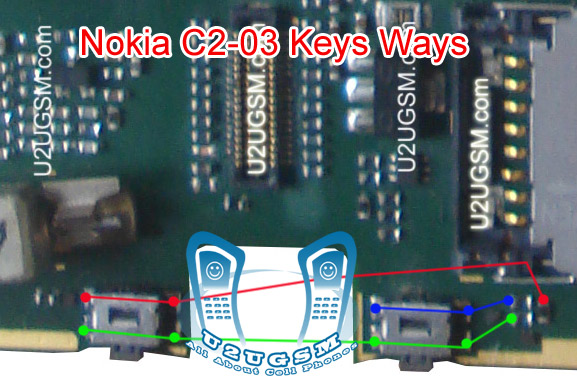
If Volume Up or Down key is not working in Nokia C2-06 then it can be the cause of Volume Switch or Resistance near by it.
So disassemble mobile phone and check whole mother board.
If there is some rust or carbon clean it with electronics cleaner and apply some heat so that it can be dry.
Check these tracks as shown in red and green lines in above diagram.
If some prints are missing or a few parts are damage apply jumpers or replace damaged parts.
If Volume Switch is damage or broken then replace it with new one.
Warnings:
Do not apply much heat it can be harm for your skin and mobile phone.
Try that board get fully dry.
When you are removing old volume switch make sure you will not damage prints from mother board so remove it when solding iron is too much hot.Or remove it with hot air.
2-Nokia C2-06 Volume Down Key is Not Working.
Tools:-
1-Hot Air is required.
2-Solding iron is required.
3-Skrue driver keys.
4-Electronics cleaner.
5-Four leg On of Switch ( Volume Key Switch ).
6-old board of Nokia C2-06 if a few parts are damage in this board.So that they can be replaced.
Solution:-
If Volume Up or Down key is not working in Nokia C2-06 then it can be the cause of Volume Switch or Resistance near by it.
So disassemble mobile phone and check whole mother board.
If there is some rust or carbon clean it with electronics cleaner and apply some heat so that it can be dry.
Check these tracks as shown in red and green lines in above diagram.
If some prints are missing or a few parts are damage apply jumpers or replace damaged parts.
If Volume Switch is damage or broken then replace it with new one.
Warnings:
Do not apply much heat it can be harm for your skin and mobile phone.
Try that board get fully dry.
When you are removing old volume switch make sure you will not damage prints from mother board so remove it when solding iron is too much hot.Or remove it with hot air.
Nokia 5250 MMC Memory Card Problem Solution Ways Jumpers
if Memory Card MMC is not working proper in Nokia 5250 or having fault inset Memory Card or Memory Card is not inserted etc problem then here is diagram Nokia Asha 200 MIC Jumper Ways Problem Solution

that will help you to solve this issue all parts that are shown in diagram with blue lines and box are used in mmc function so resold these parts and if problem not solve then replace these parts it will help you to solve memory card problem in Nokia 5250.
that will help you to solve this issue all parts that are shown in diagram with blue lines and box are used in mmc function so resold these parts and if problem not solve then replace these parts it will help you to solve memory card problem in Nokia 5250.
Nokia C2 01 Speaker Ear piece is not working problem solution
This post is about to solve speaker problem in Nokia C2-01 in a few easy steps. 
Speaker can be damage and it may have noise in voice and in some cases it can be low voice quality in it.So in all these problems about speaker of Nokia C2-01 replace speaker after dis assembly of Nokia C2-01.
If replacement of speaker could not solve problem check all these tracks that are given in above diagram to solve ear piece problem.If any print out of these is missing apply jumpers and if any part is missing or damage replace them.
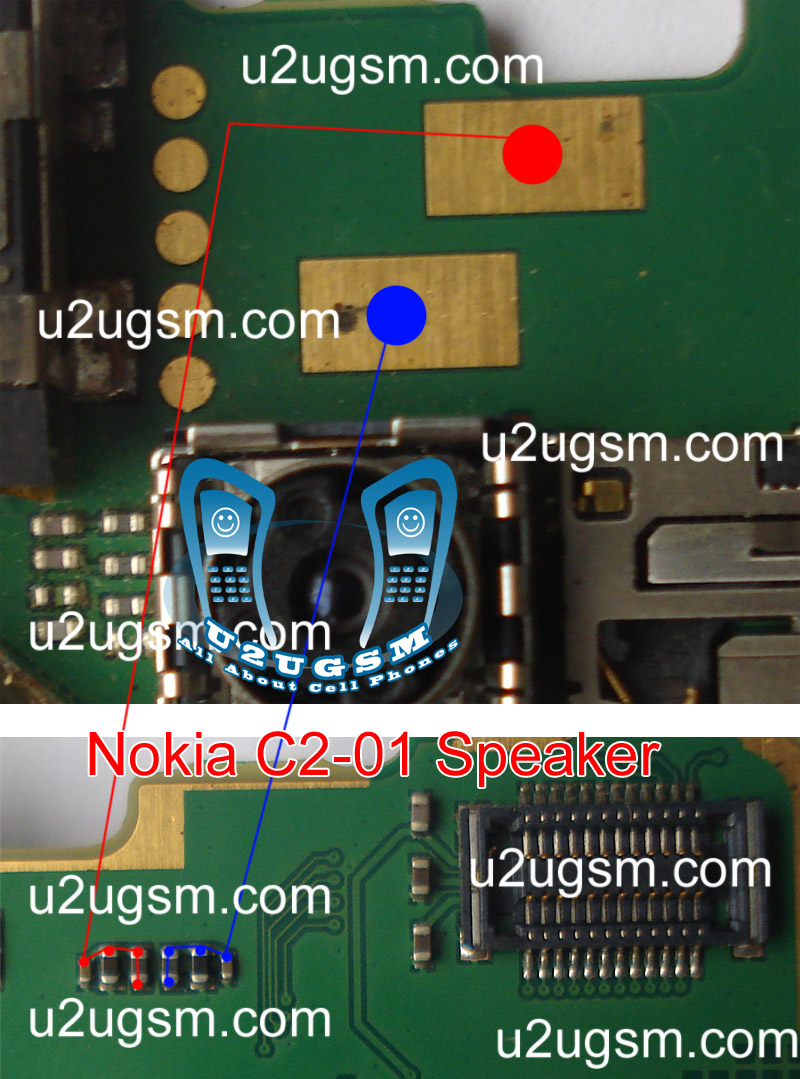
Speaker can be damage and it may have noise in voice and in some cases it can be low voice quality in it.So in all these problems about speaker of Nokia C2-01 replace speaker after dis assembly of Nokia C2-01.
If replacement of speaker could not solve problem check all these tracks that are given in above diagram to solve ear piece problem.If any print out of these is missing apply jumpers and if any part is missing or damage replace them.
Tuesday, November 4, 2014
Nokia Asha 311 Lcd Keypad Led light problem solution jumper ways
if lcd or keypad led lights are not lighting not working proper in Nokia Asha 311 you can solve this problem with diagram bellow and by following tips and tricks that i am going to teach you in diagram bellow.

In above diagram you can see red and blue color lines that are used in lighting function of lcd.Check them with meter and if any of them is missing apply jumpers as shown in it.
a three leg ic is also in lined with red color so keep in mind to check this also as shown in repairing diagram above.
for more detail and new tips and tricks about cellphone service problem keep visiting this page we will update daily this blog timely with other mobile solution.
In above diagram you can see red and blue color lines that are used in lighting function of lcd.Check them with meter and if any of them is missing apply jumpers as shown in it.
a three leg ic is also in lined with red color so keep in mind to check this also as shown in repairing diagram above.
for more detail and new tips and tricks about cellphone service problem keep visiting this page we will update daily this blog timely with other mobile solution.
Nokia 111 Not Charging Problem Solution Jumper Ways
when we plugin charging pin into charging jack of Nokia 111 and it do not shows any thing it can be fault of missing track or parts in it and can be fault of charging base.While if it shows not charging then it can be reason of water damages or low volt.so here is a diagram to help you to understand charging parts and there tracks.

look at above diagram and clean all these parts which are given in it.clean all these parts and apply hot air to dry the board.Check these parts with meter and if path is missing apply jumpers as given in above diagram solution.to Fix charging problem you can replace charging base also.Red line shows positive track of charging function while blue is a ground print.
for more detail and new tips and tricks about cellphone service problem keep visiting this page we will update cellphone service diagrams timely with new cellphone diagrams.some related post are also given bellow you can read them also for more information about cellphone.
Read More..
look at above diagram and clean all these parts which are given in it.clean all these parts and apply hot air to dry the board.Check these parts with meter and if path is missing apply jumpers as given in above diagram solution.to Fix charging problem you can replace charging base also.Red line shows positive track of charging function while blue is a ground print.
for more detail and new tips and tricks about cellphone service problem keep visiting this page we will update cellphone service diagrams timely with new cellphone diagrams.some related post are also given bellow you can read them also for more information about cellphone.
Subscribe to:
Posts (Atom)
