Showing posts with label jumpers. Show all posts
Showing posts with label jumpers. Show all posts
Thursday, November 6, 2014
Nokia C2 01 power button On Off switch not working ways jumpers
If Nokia C2-01 is not getting power On and it can make charging. It is 100% fault of on off button in it.because On Off button on keypad is not working so that it will not be able to power On.All cellular mobile repair solution Nokia 2320 Classic Camera Problem Solution Jumpers Ways
Nokia C2-01 power button On Off switch not working ways jumpers.Replace battery and check if mobile can not be switch On dis assemble the phone and check power switch button ways as given in above diagram.If any print out of these is missing apply jumpers to solve On Off Button problem in Nokia C2-01 .
for more detail and new tips and tricks about cellphone service problem keep visiting this page we will update daily this blog timely with other mobile solution.
Nokia C2-01 power button On Off switch not working ways jumpers.Replace battery and check if mobile can not be switch On dis assemble the phone and check power switch button ways as given in above diagram.If any print out of these is missing apply jumpers to solve On Off Button problem in Nokia C2-01 .
for more detail and new tips and tricks about cellphone service problem keep visiting this page we will update daily this blog timely with other mobile solution.

Wednesday, November 5, 2014
Nokia Asha 311 Volume and Lock Keys Not working Jumpers
 Nokia Asha 311 Volume and Keypad lock keys problem can be solve with a few steps and jumpers that i am going to teach in this post and given in diagram bellow.So following these tips and tricks we can solve volume and keypad lock key lock keys easily.
 If volumes are not working we will not be able to volume up or down we also can not use keypad if keypad lock button is not working in Nokia Asha 311.So look at above diagram and clean all these parts that are given in it.
Apply heat to so that it can be dry for a few mint.Do not apply much heat because it can harm your skin and may can damage mother board also.
Check all these tracks that are given in repairing diagram and if any of them is missing apply jumpers as shown in it.If any button switch or part is damage you can replace it with new one.
Nokia 5250 MMC Memory Card Problem Solution Ways Jumpers
if Memory Card MMC is not working proper in Nokia 5250 or having fault inset Memory Card or Memory Card is not inserted etc problem then here is diagram Nokia Asha 200 MIC Jumper Ways Problem Solution

that will help you to solve this issue all parts that are shown in diagram with blue lines and box are used in mmc function so resold these parts and if problem not solve then replace these parts it will help you to solve memory card problem in Nokia 5250.
that will help you to solve this issue all parts that are shown in diagram with blue lines and box are used in mmc function so resold these parts and if problem not solve then replace these parts it will help you to solve memory card problem in Nokia 5250.
Wednesday, October 29, 2014
Nokia C5 06 Not Charging Problem Solution Jumpers
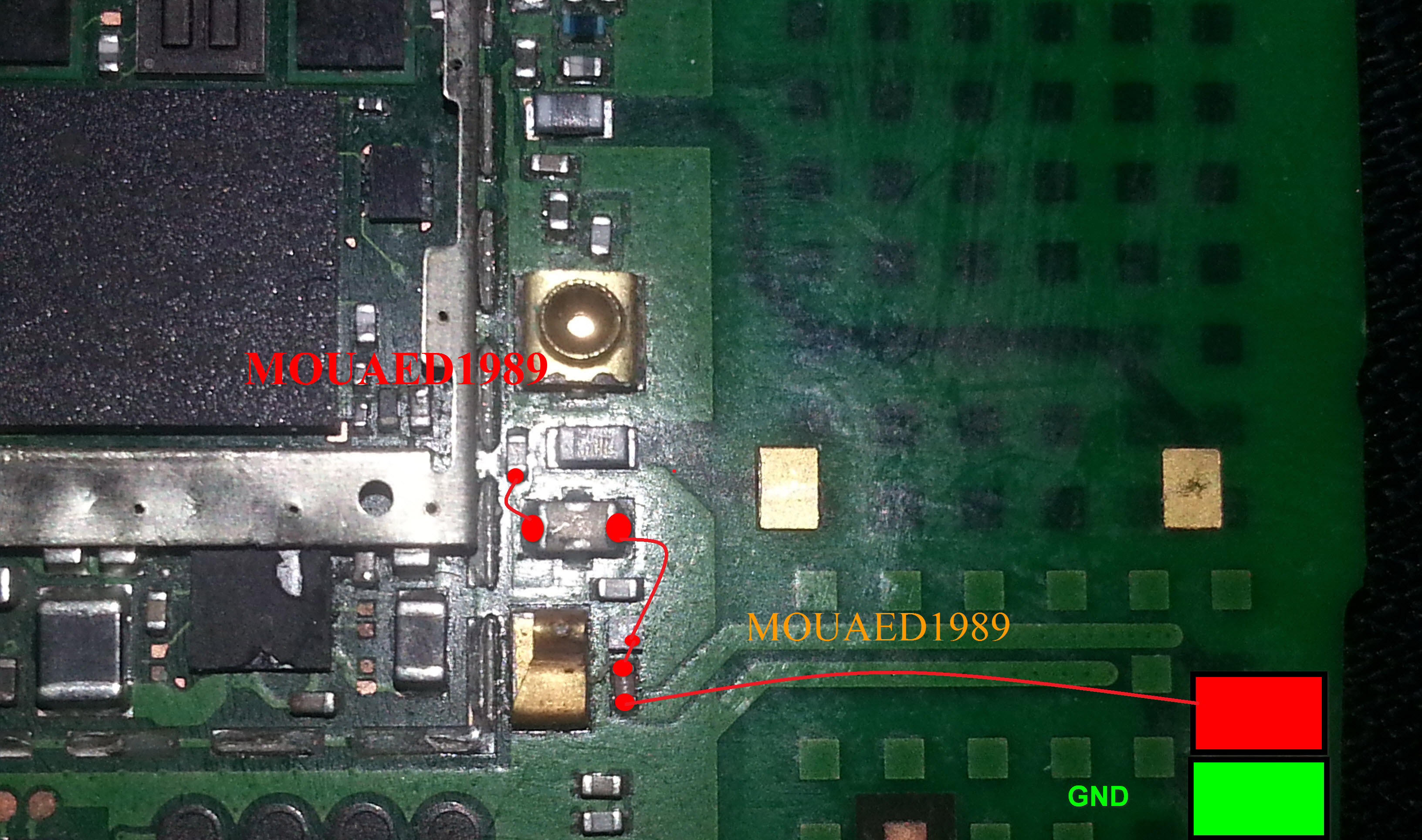 If we want to solve not charging problem in Nokia C5-06 this diagram will help us to solve and fix this problem of charging in Nokia C5-06.Nokia Asha 202 Battery Terminal Jumper Solution
In this diagram red color line is to identify that charging path of Nokia C5-06.In solution of charging problem of Nokia C5-06 we have to check a few things as given bellow.
Plug in charger into Nokia C5-06 charging pin.
If it did not show any notification it can be fault of charging pin. Fault of charger or due to some missing components.
If shows not charging notification it can be cause of values of components.
So after dis assamble of Nokia C5-06 check all these things which are given above to solve not charging problem in Nokia C5-06.
This diagram is sent to us by one of our guest poster and it is taken from gem-flash a gsm portal.
for more detail and new tips and tricks about cellphone service problem keep visiting this page we will update cellphone service diagrams timely with new cellphone diagrams.some related post are also given bellow you can read them also for more information about cellphone.
Tuesday, October 28, 2014
Nokia C5 00 Handfree IC Not working problem solution with jumpers
If you find a handfree problem in Nokia C5-00. Hand free open Handfree not dected problem it can be solve with a few easy steps that i will write in this post. A handfree repairing diagram is also attached with this post that will show you the main parts that are used in handfree function in Nokia C5-00.

So once you have review the repairing diagram for Nokia C5-00 clean handfree jack and these parts that are identified in above diagram. Clean them with electronics cleaner and apply heat to dry the mother board.Do not apply much hot air because it can harm you skin and may can damage the mother board.
Remove the ic and apply jumpers as shown in section one of the diagram Then change the second part which is given in repairing diagram for handfree problem in Nokia c5-00.
for more detail and new tips and tricks about cellphone service problem keep visiting this page we will update cellphone service diagrams timely with new cellphone diagrams.some related post are also given bellow you can read them also for more information about cellphone.
So once you have review the repairing diagram for Nokia C5-00 clean handfree jack and these parts that are identified in above diagram. Clean them with electronics cleaner and apply heat to dry the mother board.Do not apply much hot air because it can harm you skin and may can damage the mother board.
Remove the ic and apply jumpers as shown in section one of the diagram Then change the second part which is given in repairing diagram for handfree problem in Nokia c5-00.
for more detail and new tips and tricks about cellphone service problem keep visiting this page we will update cellphone service diagrams timely with new cellphone diagrams.some related post are also given bellow you can read them also for more information about cellphone.
Thursday, October 16, 2014
Nokia 6230 6230i Keypad Problem

Nokia 6230 / 6230i Keypad IC Ways
Nokia 6230 / 6230i Keypad IC Jumpers
Nokia 6230 / 6230i keypad Tracks
Nokia 6230 / 6230i keypad jumpers
Monday, September 15, 2014
5250 Power Button Ways Jumpers

your Nokia 5250 power button prints are broken diagram below can help
you.
Both Power button connector points on the right marked as black and
bottom left are ground. The upper left point is the main jumper point.
If that print is broken make the jumper as shown in the following
diagram. If the power button and jumper points are in good shape then
change the marked IC with a new one.
Please Note that we will edit these solutions or add new ones if found
in this page at any time in the future. So feel free to come back any
time on this page to stay up to date.
If you have further Questions please don't hesitate to leave a comment.
Note: Every repairing solution posted here is tested by at least one
member of our team. Use the information available here at Your Own
Risk. We are not responsible if any harm comes to your device during
the repairing process.
Thursday, August 7, 2014
Asha 305 Asha 306 Rumble Ways Jumpers
The solution in this article is for Nokia Asha 305 and Nokia Asha 306 Rumble Problem. It works for both of these phones.
Rumble motor sometimes gets faulty because of shortage or moisture in Nokia Asha 306. Replacing it is the best course of action. I have marked Nokia Asha 306 Rumble Ways Jumper points in the following diagram in case any of its prints are broken.
Please Note that we will edit these solutions or add new ones if found in this page at any time in the future. So feel free to come back any time on this page to stay up to date.

If you have further Questions please dont hesitate to leave a comment.
Note: Every repairing solution posted here is tested by at least one member of our team. Use the information available here at Your Own Risk. We are not responsible if any harm comes to your device during the repairing process.
Subscribe to:
Posts (Atom)
