Showing posts with label this. Show all posts
Showing posts with label this. Show all posts
Friday, October 31, 2014
Nokia 2320 keypad is not working it can be cause of water damage or broken parts In this problem
If Nokia 2320 keypad is not working it can be cause of water damage or broken parts.In this problem whole keypad or a set of keys will not work.Nokia E52 Handfree IC Not working headset problem solution

So to solve keypad problem, Keypad not working problem solution check this ic which is used as keys controller.Re sold this ic or re flow this keypad ic. If resolding of keypad ic can not solve keypad problem you have to replace it or short with jumpers.
for more detail and new tips and tricks about cellphone service problem keep visiting this page we will update cellphone service diagrams timely with new cellphone diagrams.some related post are also given bellow you can read them also for more information about cellphone
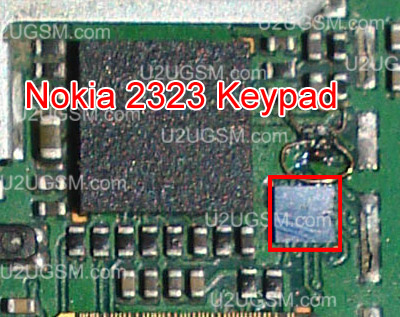
So to solve keypad problem, Keypad not working problem solution check this ic which is used as keys controller.Re sold this ic or re flow this keypad ic. If resolding of keypad ic can not solve keypad problem you have to replace it or short with jumpers.
for more detail and new tips and tricks about cellphone service problem keep visiting this page we will update cellphone service diagrams timely with new cellphone diagrams.some related post are also given bellow you can read them also for more information about cellphone

Friday, August 8, 2014
LG Flash Tool 2014 HOw To Using This Tool Guide Free Download
LG Flasher Tool 2014-The best way to Flash LG KDZ Rom Free Download

1. Version:
+ Build 25/06/2014 : Initial Version
+ Build 27/06/2014 : Fix not working with windows XP
+ Build 03/07/2014 : Fix not working with some machine run windows 8/8.1 64bit
2. Whats news:
+ This is a modified version of UpTestEX v1.2.3.1 and working with all LG Smartphone Models
+ Re-design GUI simpler.
+ Working without LG Mobile Support Tool installed !
+ Working with lastest version of LG Mobile Support Tool.
+ Dont need to use hosts file or run http server to bypass anymore !
+ Default language is set to English. Dont need to choose language any more !
3. Tutorial:
+ Download and setup LG Driver : Here
+ Download LG Flash Tool 2014 tool and extract :Here
+ Enter to Download Mode and plug USB into your PC
+ WARNING : Remember copy KDZ file into LG Flash Tool 2014 folder
+ Run LGFlashTool2014.exe and do as following pictures :
+ If you cannot run LGFlashTool2014.exe, please install Visual C++ Runtime Library :Here
Normal Flash: Flash ROM without losing any data. Only use this when you need to fix system error. Beware of boot loop when flashing ROM that differ from current ROM on your phone or MOD ROM.
CSE Flash: Choose this option when you need a fresh format. All data will be gone. Its suitable for upgrading or downgrading ROM or simply use this when you need to back to Stock.
+ Build 25/06/2014 : Initial Version
+ Build 27/06/2014 : Fix not working with windows XP
+ Build 03/07/2014 : Fix not working with some machine run windows 8/8.1 64bit
2. Whats news:
+ This is a modified version of UpTestEX v1.2.3.1 and working with all LG Smartphone Models
+ Re-design GUI simpler.
+ Working without LG Mobile Support Tool installed !
+ Working with lastest version of LG Mobile Support Tool.
+ Dont need to use hosts file or run http server to bypass anymore !
+ Default language is set to English. Dont need to choose language any more !
3. Tutorial:
+ Download and setup LG Driver : Here
+ Download LG Flash Tool 2014 tool and extract :Here
+ Enter to Download Mode and plug USB into your PC
+ WARNING : Remember copy KDZ file into LG Flash Tool 2014 folder
+ Run LGFlashTool2014.exe and do as following pictures :
+ If you cannot run LGFlashTool2014.exe, please install Visual C++ Runtime Library :Here
Normal Flash: Flash ROM without losing any data. Only use this when you need to fix system error. Beware of boot loop when flashing ROM that differ from current ROM on your phone or MOD ROM.
CSE Flash: Choose this option when you need a fresh format. All data will be gone. Its suitable for upgrading or downgrading ROM or simply use this when you need to back to Stock.


No need to choose desired language, it automatically change to English as a default setting.

Subscribe to:
Posts (Atom)
