Showing posts with label in. Show all posts
Showing posts with label in. Show all posts
Friday, October 31, 2014
Nokia 2320 keypad is not working it can be cause of water damage or broken parts In this problem
If Nokia 2320 keypad is not working it can be cause of water damage or broken parts.In this problem whole keypad or a set of keys will not work.Nokia E52 Handfree IC Not working headset problem solution

So to solve keypad problem, Keypad not working problem solution check this ic which is used as keys controller.Re sold this ic or re flow this keypad ic. If resolding of keypad ic can not solve keypad problem you have to replace it or short with jumpers.
for more detail and new tips and tricks about cellphone service problem keep visiting this page we will update cellphone service diagrams timely with new cellphone diagrams.some related post are also given bellow you can read them also for more information about cellphone
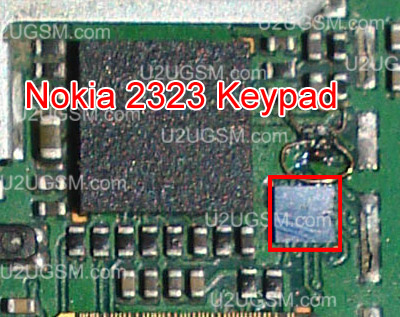
So to solve keypad problem, Keypad not working problem solution check this ic which is used as keys controller.Re sold this ic or re flow this keypad ic. If resolding of keypad ic can not solve keypad problem you have to replace it or short with jumpers.
for more detail and new tips and tricks about cellphone service problem keep visiting this page we will update cellphone service diagrams timely with new cellphone diagrams.some related post are also given bellow you can read them also for more information about cellphone

Tuesday, September 16, 2014
How To Install Android 4 4 Kitkat In Samsung Galaxy S3 I9305 LTE
Warnings:
Below are some warning statements that you must be knowing before preparing to Root orInstall Custom Rom in your Samsung Galaxy S3 LTE Android Smartphone:
Below are some warning statements that you must be knowing before preparing to Root orInstall Custom Rom in your Samsung Galaxy S3 LTE Android Smartphone:

- Rooting/Installing Custom ROM is not an authorized process hence you’ll be losing all your warranty benefits over your Samsung Galaxy S3 LTE after Rooting/Installing it.
- There are certain risks of damaging your Android Smartphone while Rooting/Installing Custom ROM in it. Hence, it is recommended that you proceed at your own risk and we are not to be held responsible even if your Smartphone gets damaged during or after completing the Rooting/Custom ROM installation process.
- You might not receive any future official software or firmware updates after rooting and installing Custom ROM in your Samsung Galaxy S3 LTE.
- You need a Windows based PC or Laptop.
- Root & Install Custom Recovery in your Samsung Galaxy S3 LTE.(Links are given in Some Important Articles section above)
- Download Samsung USB Drivers and connect your device with PC for complete the installation.
- Download Samsung USB Drivers or Download Samsung Kies (Contains Drivers).
- Enable USB Debugging in your Samsung Galaxy S3 LTE.Click Here if you don’t know how to enable.
- Your device must be charged 50% minimum.
- Make backup of device data for safety.
How To Update Samsung Galaxy S3:
- Follow all the instruction given above for safe installation.
- Now connect you device to PC with USB cable.
- Move or Copy both downloaded files on your external sdcard.
- Now switch off your device and boot into recovery mode.To do this, Press and Hold Volume Up + Home and Power buttons.
- Once you’re in Recovery Mode, Select wipe data/factory reset, followed by wipe cache and wipe dalvik cache from advanced.
- Now go back to the main menu of Recovery Mode and select “install zip from SD card”.
- Select and Install custom rom zip file and then GApps package.
- After successful installation, go back to main menu of Recovery Mode and select reboot system now.
- First boot can take upto 5 minutes.
Saturday, September 6, 2014
Android Customize Power Notification Bar In CyanogenMod 9
Android: Customize Power Notification Bar in CyanogenMod 9 - Android Power Notification bar provides you fast access to several common used options like GPS, WiFi, Maps etc.

If you don’t just like the power notification bar default buttons, due to CyanogenMod nine, youll be able to modify these buttons and changes their functions. Here you may find out how to customise notification bar in CyanogenMod 9.

If you don’t just like the power notification bar default buttons, due to CyanogenMod nine, youll be able to modify these buttons and changes their functions. Here you may find out how to customise notification bar in CyanogenMod 9.
- tap on Settings in app drawer screen.
- under Interface section, select System.
- tap on the Notification drawer.
- At the bottom of screen, you may gismo buttons. Touch it.
- currently a gismo buttons screen can opens and here youll be able to select the buttons to be displayed in power notification bar by checking the boxes next to every button.
- If you would like to get rid of any button from power notification bar, uncheck the box next thereto button.
- To tweak the button, scroll all the way down to bottom and you may see modes for Sound, Network, Screentimeout and Brightness. once tweaking your required modes, select OK. You power notification bar can modification as before long as you hit OK button to use these changes.
Friday, August 22, 2014
Completed Schematics Nokia 2010 All in one
.gif)
2.jpg)
Supported Models:
Schematics Nokia Super Completed in this years...
- with 12 page and the file size is almost 700 mb
- easier for you to choose which phone schematic will be selected
- almost 350 more Nokia phone schematic & service manual all in one package
-List File
1100_1101 ServiceManual_L12.pdf
1100_1101-rh18-Schematics.pdf
1100_Schematics.pdf
1101a.pdf
1101b.pdf
1110_1600_schematics.pdf
1200_rh-99_100_schematics.pdf
1202_RH-112_RH-113_SM_L1L2_v10.pdf
1255_schematics.pdf
1265.pdf
1325_RH104_SM_schem_V1.0_20070427.pdf
1600 rh-64_rh-70_sm.pdf
1600_RH-70_RH-64_schematics_V1_0.pdf
1610_1611 Schematics.pdf
1650_1650b_rm-305_rm-306_sm_l1_l2.pdf
1661_RH-121_122_SM_Level_1&2_v1 0.pdf
1680classic_RM-394_RM-395_SM_L1&2.pdf
1680classic_RM-394_schematics_v1_0.pdf
2100_schematics_v2_0.pdf
2112_schematics.pdf
2116_schematics.pdf
2118_schematics.pdf
2125_schematics.pdf
2220_schematics.pdf
2255_schematics.pdf
2280_schematics.pdf
2300-rm4-Schematics.pdf
2310_RM-189_schematics_v1.pdf
2320classic_2323_classic_2330classic_Service_Manual_v2.0.pdf
2320_2323_2330c_RM512_513_514_515_543_SM_L1&2_v1.0.pdf
2330_2320_2323c_RM512_513_514_515_543_schematics_v1_0.pdf
2355_schematics.pdf
2505_RM307_SM_schem_level3&4.pdf
2600-RH59_60-schematics.pdf
2600classic_RM-340_schematics_v1_0.pdf
2610_schematics_v1.pdf
2626_RM-291_schematics_v1_0.pdf
2630_schem.pdf
2650_rh-53_schematics_1_0.pdf
2660_2760 ServiceManual_L12_2760.pdf
2660_2760_RM-258_RM-259_RM-292_RM-293_schematics.pdf
2680s_RM392_schematics_v1_0.pdf
2700c_RM-561_schematics_v1_0.pdf
2700c_RM-561_Service_Manual_L1L2_v2.0.pdf
2720Fold_RM519_schematics_v1_0.pdf
2730classic_2730C RM-578_579_Service_Manual_L1L2_v1_0.pdf
2730C_RM-578_579_schematics_V1_0.pdf
2760_RM-258_RM-259_RM-292_RM-293_schematics.pdf
2865.pdf
3100 rh-19_schematic_1_0.pdf
3108_schematics.pdf
3109c_RM-274_schematics_v1_0.pdf
3110c_RM-237_schematics.pdf
3120classic_RM-364_schematics_v2.pdf
3155_schematics.pdf
3200_Schematics.pdf
3210.pdf
3220_rh-37_schematics.pdf
3230.pdf
3230_RM-51_service_manual_level1_2_v1.pdf
3250_schematics.pdf
3300_schematics.pdf
3310 nhm-5_schematics.pdf
3360-11Schem.pdf
3390 -3310 schem!convert oke.pdf
3500classic_RM-272_RM-273_schematics_v1_0.pdf
3510i_Schematics.pdf
3510_Schematics.pdf
3530_schematics.pdf
3555_RM-257_RM-270_RM-277_schematics.pdf
3560_schematics.pdf
3585 10-npd1schem.pdf
3585i_schematics.pdf
3586i_schematics.pdf
3590_schematics.pdf
3595_schematics.pdf
3600s_RM352_schematics_v1_0.pdf
3600_Schematics.pdf
3610 12-nam1-schem.pdf
3610 12-nam1_07-schem.pdf
3610a_RM-429_SM_L1&2_v_1_0.pdf
3610fold_RM-429_Schematics.v.1.0.pdf
3650_3660a.pdf
3650_3660b.pdf
3650_3660c.pdf
3650_3660d.pdf
3650_Schematics.pdf
3710fold_3710 RM-509_510_Service_Manual_L1L2_v1_0.pdf
3710Fold_RM509_RM510_schematics_v1_0.pdf
3720classic_RM-518_v_1_0_schematics.pdf
3720_classic_RM-518_v_1_0_SM_L1&2.pdf
5000_RM-362_RM-363_SM_L1&L2.pdf
5000_RN-362_schematics_v1_0.pdf
5100-npm6_schematics_v1_0.pdf
5110_schematics.pdf
5120_schematics.PDF
Nombre total de fichiers = 105
Download
size: 57 Mb *10 part
http://hotfile.com/dl/64820440/33abb55/Completed_Schematics_Nokia_2010_(All_in_one)_www.fixedgsm.com.part01.rar.html
http://hotfile.com/dl/40437771/bccece1/Completed_Schematics_Nokia_2010_(All_in_one)_www.fixedgsm.com.part02.rar.html
http://hotfile.com/dl/40445837/f52ee67/Completed_Schematics_Nokia_2010_(All_in_one)_www.fixedgsm.com.part03.rar.html
http://hotfile.com/dl/40458367/f971e52/Completed_Schematics_Nokia_2010_(All_in_one)_www.fixedgsm.com.part04.rar.html
http://hotfile.com/dl/40463026/b12d6f4/Completed_Schematics_Nokia_2010_(All_in_one)_www.fixedgsm.com.part05.rar.html
http://hotfile.com/dl/40544189/5987720/Completed_Schematics_Nokia_2010_(All_in_one)_www.fixedgsm.com.part06.rar.html
http://hotfile.com/dl/40553882/d696d31/Completed_Schematics_Nokia_2010_(All_in_one)_www.fixedgsm.com.part07.rar.html
http://hotfile.com/dl/40554436/6983d9c/Completed_Schematics_Nokia_2010_(All_in_one)_www.fixedgsm.com.part08.rar.html
http://hotfile.com/dl/40562807/79ca105/Completed_Schematics_Nokia_2010_(All_in_one)_www.fixedgsm.com.part09.rar.html
http://hotfile.com/dl/40562359/abc0cf3/Completed_Schematics_Nokia_2010_(All_in_one)_www.fixedgsm.com.part10.rar.html
Subscribe to:
Posts (Atom)
