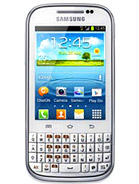
Recognised XDA Developers, Chainfire recently released CF-Auto-Root file for variants of Samsung Galaxy Chat bearing model number GT-B5330/B/L.
CF-Auto-Root is the root for "rooting beginners" and those who want to keep as close to stock as possible. CF-Root is meant to be used in combination with stock Samsung firmwares, and be the quickest and easiest way for your first root. In essence, it does nothing but install and enable SuperSU on your system, so apps can gain root access. Head over to the CF-Auto-Root main thread to learn more about the root method.
Samsung Galaxy Chat B5330/B/L users who have already installed their devices with Android 4.1.2 Jelly Bean, may root their devices using the tutorial below.
Disclaimer: Rooting voids the warranty of your device. We and the developer of this rooting procedures shall not be held responsible if any undesirable outcomes may happen to your device. use of this root guide is solely at your own risk!
Pre-requisites
1. Install USB Driver for Samsung Galaxy Chat on the computer.
2. Enable USB Debugging Mode on the phone by navigating to Settings >> Developer Options (Android 4.0 or later) or go to Settings >> Applications >> Development (Android 2.3 or earlier).
3. Make a backup of all your important data before following the guide.
4. The Galaxy Chat should be factory unlocked and not locked to any particular carrier.
5. Ensure the battery of the phone is charged more than 80 per cent.
6. The CF-Auto-Root file works only on Samsung Galaxy Chat B5330/B/L. Applying this to any incorrect variant might brick the device. Verify the model number of the Galaxy Chat by navigating to Settings >> About Phone.
File Required
1. CF-Auto-Root for Galaxy Chat GT-B5330 (CF-Auto-Root-zanin-zaninxx-gtb5330.zip), GT-B5330B (CF-Auto-Root-zanin-zaninvj-gtb5330b.zip), or GT-B5330L (CF-Auto-Root-zanin-zaninub-gtb5330l.zip)
2. Odin 3.07
Steps to Root Galaxy Chat B5330/B/L Running on Android 4.1.2 Jelly Bean Firmware
Step 1: Extract CF-Auto-Root and Odin 3.07 files using winrar/7zip/winzip or any other extracting tool.
Step 2: Switch off the Galaxy Chat. Then boot the device into Download Mode by pressing and holding Volume Down + Home buttons together and then press the Power button until the device turns on. Now press the Volume Up button to enter Download Mode.
Step 3: Launch Odin on the computer.
Step 4: Connect the Galaxy Chat to the computer using USB cable while it is in the Download Mode. Wait until Odin detects the device. When the device is connected successfully, the ID: COM box will turn yellow with the COM port number. Additionally, the successful connected will be indicated by a message saying Added. If Odin fails to detect the device then re-install USB driver.
Step 5: In Odin, click the PDA button and select the CF-Auto-Root with .tar.md5 file.
Step 6: Verify that Auto Reboot and F.Reset Time checkboxes are selected in Odin. Also, ensure the Re-Partition option in Odin is not selected.
Step 7: Double-check and click Start in Odin. The installation process will now begin.
Step 8: Once flashing completed, your phone will restart and soon you will see a PASS message with green background in the left-most box at the very top of the Odin. You can now unplug the USB cable to disconnect your device from computer.
Samsung Galaxy Chat B5330/B/L running on Android 4.1.2 Jelly Bean firmware is now rooted successfully. You can now install any app that requires root permission. Verify the root status of the device by downloading Root Checker app from Google Play Store.
Thursday, September 18, 2014
Nokia 2700c handsfree Problem Solution
Nokia 2700c handsfree solution,Headset Not Detected Solution,Show On Device Solution Just Replace It Now.

Read More..
BIRD V750 MIC Solution


BIRD V750 MIC Solution 100% Ok....,
if you check it much give few comments about this so that others can learn form your comments also.
If you have any other Questions please do not hesitate to share with me.
Nokia 1616 network ic jumper
May be many reason of Nokia 1616 network problem.Pa damage is one of them.When damage pa then have no network on this phone or network stay some seconds.If you have this problem of your phone then you can apply this solution.

How to do this work: If you face this problem then first check your sim card.Because some time are network problem for sim card.If problem still then rplace pa of other same phone.If you have no pa on your hand then you can apply this jumper.

How to do this work: If you face this problem then first check your sim card.Because some time are network problem for sim card.If problem still then rplace pa of other same phone.If you have no pa on your hand then you can apply this jumper.
Wednesday, September 17, 2014
Nokia 305 mic problem solution
Nokia asha 305 mic not working solution is very easy.I make this solution very simple ways.so every body can repair this problem very easily.If Your phones has mic problem that means mic not work or mic poor sound or bad noise then repair your phones problem following this solution.

How to do this : Check mic or replace good mic if problem same then check this line next check mic related components I hope your problem will be solve.
You may also like :
Nokia 3110c mic problem solution
Nokia 2690 mic problem solution
Nokia 110 mic not work problem solution

How to do this : Check mic or replace good mic if problem same then check this line next check mic related components I hope your problem will be solve.
You may also like :
Nokia 3110c mic problem solution
Nokia 2690 mic problem solution
Nokia 110 mic not work problem solution
Nokia X2 00 power on off Ways Solution
Nokia X2 with Battery Power Ways, Power Button, Power Key, Power Switch, Power Problem
nokia x2-00 power on off
Nokia-x2-power-on-off-ways
nokia x2 power ways, nokia x200 switch on problem, how to repair nokia x2-00 power button.
nokia x2-00 power switch ways, x2 on off ways, nokia x2 power solution, nokia x2 button problem, nokia x2 00 on off solution ways

Nokia X2-00 Power Key Ways.
Nokia X2-00 Power switch ways
nokia x2-00 power on off
Nokia-x2-power-on-off-ways
nokia x2 power ways, nokia x200 switch on problem, how to repair nokia x2-00 power button.
nokia x2-00 power switch ways, x2 on off ways, nokia x2 power solution, nokia x2 button problem, nokia x2 00 on off solution ways
Nokia X2-00 Power Key Ways.
Nokia X2-00 Power switch ways
Samsung S3350 Ch t 335 Cellular Phone Charging Ways Jumper fix problem
Samsung S3350 Ch@t 335 Cellular Phone Charging Ways Jumper How to Fix problem,Samsung S3350 Ch@t 335 Cellular Phone Charging Ways Jumper Tricks How to Fix problem,Samsung S3350 Ch@t 335 Cellular Phone Charging Ways Jumper Repair How to Fix problem,Samsung S3350 Ch@t 335 Cellular Phone Charging Ways Jumper Problem How to Fix problem,Which Line Jumpering Red Marked Shown On Diagram ,If You Face Samsung M8800 insert Sim Problem See Now Our PRevious Post & Enjoy,Samsung S3350 Ch@t 335 Cellular Phone ChargingNot Show How to Fix problem,Samsung S3350 Ch@t 335 Cellular Phone Charging How To Reworking How to Fix problem Step By Step Procedure here,Share This Post If You Tested & Visit Again Our Cellular Phone Repairing Engineer Store.
Subscribe to:
Posts (Atom)
