Thursday, November 20, 2014
Samsung Galaxy Note hard reset restore factory settings code

Samsung Galaxy Note hard reset , restore factory settings
Power off the N7000 Galaxy Note. Press and hold both Volume Up +の Home+power on. In the recovery menu select wipe data のfactory reset with Volume button. Pressの power to confirm. All data will be lost!
Soft Reset the Galaxy Note GT-N7000 device: press and hold the Power /Reset/Lockの key for 10-15 seconds.
Your device freezes or has fatal errors
If your device freezes or hangs, you may need to close programs or reset the device to regain functionality. If your
device is frozen and unresponsive,の press and hold the Power key for 10-15 seconds. The device will reboot automatically.
If this does not solve the problem, perform a factory data reset. In Idle mode, open the application list and select
Settings > Privacy > Factory data reset > Reset phone > Erase everything.
restore factory settings
Select Settings > Privacy > Factory data reset: Reset your settings to the factory default values and delete all your data.
Press Application button, then Settings > Reset settings: Reset your settings to the factory default values.
Whileusing your device, be sure to back up important data. When disposing of your device, back up all data and then reset your device
to prevent misuse of your personal information.
Use this method to hard reset your Samsung Galaxy Note N7000: Enter *2767*3855#.
Warning! All your data including contacts, messages etc. will be lost! Copy all
your necessary のdata/Contacts/Messages etc. toの SIM or make backup to your PC before
full reset! Take out SIM card before full reset. restore factory settings

Sunday, November 16, 2014
How To Samsung Galaxy S5830 Hard Reset Solutions


Saturday, November 8, 2014
Gionee Pioneer P1 Hard Reset
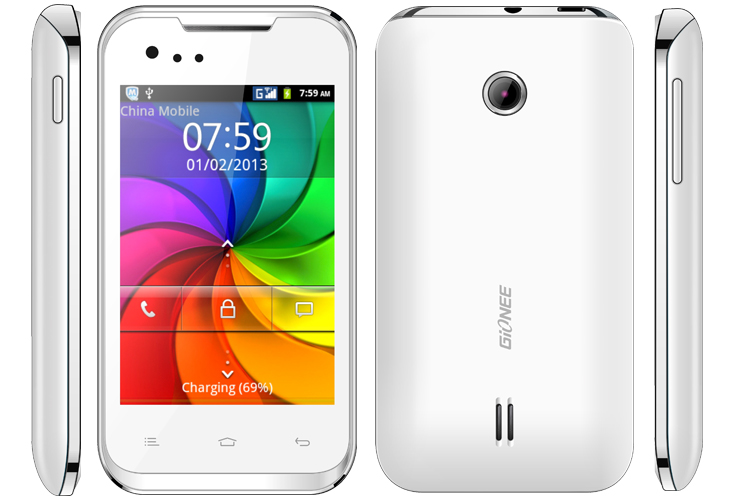
Press and hold Volume Up + Power key
you see android recovery logo
Now touch Home key for recovery menu
Now select Wipe data/factory reset with volume down and touch Menu key to confirm
Now select Yes -- Delete all user data and touch Menu Key for confirm
Now Reboot Device
Hard Reset done
Friday, November 7, 2014
Hard Reset Samsung Galaxy Fame s6810
* Forgotten Phone Lock
* Forgotten User Code
* If Your Phone Seems Frozen Due To Any Cases.
Take Care oi These Factors Before You Reset Your Phone
* Please Backup Your Data Using any Backup Software
How To Hard Reset Your Samsung Galaxy Fame
Thursday, November 6, 2014
Hard Reset Your Samsung Galaxy Stellar 4G
Sunday, November 2, 2014
How to Master Reset or Hard Reset a HTC X7500 Advantage
reset to factory settings
To perform a hard reset or Master reset, factory reset
- Slide the Volume slider down and at the same time, use the stylus to press the RESET button at the back of your device.
- After a brief period of time, two choices will appear on-screen. Press the CENTER OK button to perform the hard reset. Note If you do not want to perform a hard reset, press the CAMERA button to exit.
- Press the POWER button.
Wednesday, October 29, 2014
Hard Reset Samsung Mobile T939 Behold 2
A hard reset restores your phone to factory settings. You will lose all data on your phone and you need to reinstall everything. So you must take note all your logins, apps you may have bought and so on so you can reinstall them or copy the files in phone memory to a safe place such as a memory card.
There are two different techniques to hard reset Samsung mobile T939 Behold 2. By using the device key or the setting menu.
Using the setting menu
1. From the main home screen, tap Quick List
2. Tap Settings, then Reset settings
3. Tap Master reset
4. Enter your password, then tap Yes to confirm
Note: The default password is 0000
Using the device key
1. Power off the phone.
2. Press and hold the Volume Down, Send and End buttons in that order. Make sure you pressed and hold the three buttons together and that the end key is pressed last.
3. When a graphic appears on the display, press the Menu key to begin the reset.
Thursday, October 2, 2014
LG Intuition VS950 Hard Factory Reset Instructions
LG Intuition VS950 Hard / Factory Reset Instructions - the LG Intuition VS950 is smartphone that support for CDMA/LTE network. It has 5.0 inches, HD-IPS LCD capacitive touchscreen, 768 x 1024 pixels resolution and support 16M colors. The phone measuring 139.7 x 90.4 x 8.4 mm and powered by Dual-core 1.5 GHz processor with 1GB of RAM. The LG Intuition VS950 runs on Android 4.0.4 (Ice Cream Sandwich) operating system also equipped with 8 MP camera. Ok, by the way if you are owner of this phone and you have problem for example forget your unlock sequence and the Backup PIN, you can follow this instructions to factory reset / hard reset
LG Intuition VS950 Hard / Factory Reset Guide:
-First, turn the device off
-Then, press and hold the following keys at the same time for 5 seconds: Volume Down Key + Power/Lock Key
-Further, read the FACTORY HARD RESET screen message. Press the Power/ Lock Key to confirm or any other key to cancel
-Next instructions, you will be prompted to confirm again. Press the Power/Lock Key one more time to confirm and perform the factory reset. Or press any other key to cancel.
Factory data reset: Opens a screen to erase all of the data on the phone. Read the warning, then tap Reset phone at the bottom of the screen.
Friday, September 26, 2014
Samsung ATIV Odyssey I930 Hard Reset Instructions
Samsung ATIV Odyssey I930 Hard Reset Instructions - The Samsung ATIV Odyssey I930 phone also known as Samsung SCH-I930. This smartphone powered by Dual-core 1.5 GHz Krait procesor with Qualcomm MSM8960 Snapdragon chipset. It runs on Microsoft Windows Phone 8 operating system with 1GB of RAM. The phone measuring 122.4 x 63.8 x 10.9 mm and equipped 5MP camera. While for network work on under GSM/HSDPA/CDMA/LTE network. Ok guys, if you are owner of this smartphone, here we have information about hard reset instructions or tutorial for Samsung ATIV Odyssey I930. Read below to know about it:
Samsung ATIV Odyssey I930 Hard Reset Guide
If your phone has trouble for example freezes or hangs, so you must close programs or reset the phone to regain functionality. In addition If your phone is frozen and unresponsive, press and hold the Power key for 11-13 seconds. The phone will power off forcefully.
Factory Data Reset
But, If the above does not solve the problem, you can try perform a factory data reset. Follow this instructions: In Menu mode, select Settings > system > about > reset your phone > yes > yes.
Sunday, September 21, 2014
Hard reset Garmin Forerunner 310XT to Factory default settings
| Hard reset Garmin Forerunner 310XT to Factory default settings |
- Turn Power off
- Press and hold Enter and Mode buttons
- Press and release Power button
- Press and release Lap/Reset (watch will power off)
- Wait 3 seconds
- Release Enter and Mode
The reset on the Forerunner 310XT is only successful if the device finishes powering up, and goes to the setup wizard. Repeat the steps again if the setup wizard does not appear.
Leave the device outside with a clear view of the sky for a minimum of 20 minutes to acquire satellite data once the reset and setup wizard are complete.
Performing a soft reset
If your garmin hangs or does not responding press power buttons about 10 seconds.
Thursday, September 18, 2014
T Mobile T839 Sidekick 4G Hard Reset to Factory Default Settings
T-Mobile T839 Sidekick 4G Hard Reset to Factory Default Settings
This is a simple guide if you want to return the device to its original factory settings again.

T-Mobile Sidekick 4G Factory data reset:
1. On the main home Lcd, select menu
2. Select Settings, then Privacy
3. Select Factory data reset
4. Select Reset phone
5. Enter the password if prompted, then confirm by selecting Erase everything
T-Mobile Sidekick 4G Hard reset, this may help if the phone experience some hang or frozen on some applications:
1. Turn the phones power off. Take the battery out from the device, wait a couple of seconds and reinsert it back again.
2. Now, Hold the Volume Down button
3. Then press and hold the Power button until the device turns on
4. A menu will show up like: Fastbook, Recovery, Clear Storage, and Simlock
5. Just select Clear Storage by pressing the Volume Down button
6. Then press and release the Power button
7. Select Volume Up if YES and Volume Down for NO
Once the reset process is complete, the phone will then reboot to its factory fresh state settings.
Any data including third-party applications previously stored from the HTC Sensation already wiped or deleted.
Tuesday, September 9, 2014
How To Factory Hard Reset iView Tablet Forgot Pattern Lock User Lock About Tutorial Here
Then i tried one another solution of Installing ROM and it worked perfectly. So, as ive seen too many users asking for the solution to this, i decided to post a step by step tutorial. If you too accidently lost access to your tablet then you can also follow this tutorial to Reset or Re-Install ROM on your tablet. I suppose that this will work for every iView tablet. In my case, the model was 754TPC. So, lets follow the procedure to Hard or Factory Reset your iView Tablet. The process is very simple.
How to Hard Reset/Factory Reset or Re-Install ROM in iView Tablet:
- Go to this page and find the Firmware for your specific device model:
- iview-754tpc-cyberpad-754tpc-factory.html
If your device is not listed then try searching for your devices model in the top search box. In search results click on download tab. Now the 1st result will be like Firmware For Device Model . - Click on that link to download the Firmware for your iView Tablet.
- As i mentioned above, in my case the Tablet was 754TPC, so i searched and downloaded the Firmware which is as a .Rar file.
- Now extract that downloaded files to a folder.
- One folder will be live suite pack and other will have boot img or .iso file.
- Open the folder saying Live Suite Pack. Go to Live Suite Pack_v*** Folder. (Leave USB Driver folder as is.)
- Run this file LiveSuitPack_v1.07.exe.
- A security warning may come, click on Install this driver software anyway
- Now run the file: LiveSuit.exe
- A pop up will come with two options. Click on No.
- Click on First Icon and select the firmware file (.iso. file) that was in the extracted folder.
- Now Turn OFF your Tablet completely.
- Press and Hold Back Button and connect the tablet to computer via USB and simultaneously press Power button 7 times.
- Now a pop up will be shown on computers Lcd. Click on Yes.
- An another confirmation pop up will come, again click on Yes.
- Now the tool will start formatting your iView Tablet. Wait for the process to complete 100%.
Itll show a pop up when the formatting is completed. Click on Ok. - Disconnect your Tablet from the computer and Turn it On. It may take sometime as it is booting for the first time.
- As youll see, You have successfully unlocked your iView Tablet.
Please dont forget to say thanks via comments and like us on Facebook if it helps you
Wednesday, September 3, 2014
How to Hard Reset Sony Xperia Z1 Using Buttons
2. Keep the device turned off, then press and hold the Volume Up and Volume Down buttons.
3. Then press and hold the Power button (just keep on holding the volume buttons). Keeping those three button pressed, there should be a menu will appear on your phone.
4. Press the Volume Down button to navigate to the Recovery option. Press the Volume Up to select (if that doesnt work, use the Power button to select).
5. An Android logo will appear. Press and hold the Volume Down and Volume Up button together and the recovery menu should appear.
6. Use the Volume buttons to move to the Wipe data/Factory reset option and then press Power to select.
7. Use the Volume Down key to choose Yes and press the Power button again to select.
Tuesday, August 19, 2014
Hard Reset Motorola DROID BIONIC XT875 to Restore Factory Settings

