Showing posts with label 0. Show all posts
Showing posts with label 0. Show all posts
Tuesday, September 23, 2014
How to Install Android 4 2 2 for Galaxy Note 8 0 GT N5110 Stock Firmware Guide
N5110XXCMK1 Android 4.2.2 Jelly Bean Firmware Last Updated on 5-Feb-2014. Samsung Galaxy Note 8.0 GT-N5110 (WiFi) recently received the latest XXCMK1 Android 4.2.2 Jelly Bean official firmware update. Samsung started rolling out an OTA update about the firmware. The latest firmware build version is N5110XXCMK1. The device was released with Android 4.1.2 Jelly Bean and receiving Android 4.2.2 Jelly Bean firmware update from August 2013. There is no news about any further android version update for the Galaxy Note 8.0 N5110. If you not yet updated your device to the latest available firmware, then do it now by following the tutorial below. The below guide will help you to download and install the N5110XXCMK1 Android 4.2.2 Jelly Bean Firmware manually through Odin. You can check the latest available firmware for your device through OTA (over the air) from Settings-About Tablet-Software Update.
 If your Galaxy Note 8.0 N5110 already running on the Android 4.2.2 Jelly Bean, you can only expect few bug fixes and performance enhancement with this latest firmware update. It is always recommended to update device to the latest available firmware.
So, want to update your Galaxy Note 8.0 N5110 to the latest XXCMK1 Android 4.2.2 Jelly Bean firmware? For official way, either you can go for OTA update or download firmware through the Samsung Kies utility. However, if you are looking for a manual way to update the latest Android 4.2.2 XXCMK1 firmware on your Galaxy Note 8.0 N5110 through Odin then follow the step by step manual update guide below.
Android 4.2.2 Jelly Bean N5110XXCMK1 Official Firmware Download List
Samsung rolled out the firmware for the following countries. The firmware which are unbranded or not locked to any carrier, no matter of which country or region, can be flashed on any Galaxy Note 8.0 GT-N5110 model.
Nordic Countries: N5110XXCMK1_N5110OXXCMK1_NEE.zip
Slovakia: N5110XXCMK1_N5110OXXCMK1_XSK.zip
South East Europe: N5110XXCMK1_N5110OXXCMK1_SEE.zip
Germany: N5110XXCMK1_N5110OXXCMK1_DBT.zip
Slovenia: N5110XXCMK1_N5110OXXCMK1_SIO.zip
Portugal (TPH): N5110XXCMK1_N5110OXXCMK1_TPH.zip
Romania: N5110XXCMK1_N5110OXXCMK1_ROM.zip
Hungary: N5110XXCMK1_N5110OXXCMK1_XEH.zip
Baltic: N5110XXCMK1_N5110OXXCMK1_SEB.zip
Russia: N5110XXCMK1_N5110OXECMK1_SER.zip
Spain: N5110XXCMK1_N5110OXXCMK1_PHE.zip
United Kingdom: N5110XXCMK1_N5110OXACMJ2_BTU.zip
France: N5110XXCMK1_N5110OXXCMK1_XEF.zip
Slovakia: N5110XXCMK1_N5110OXXCMK1_XSK.zip
South East Europe: N5110XXCMK1_N5110OXXCMK1_SEE.zip
Germany: N5110XXCMK1_N5110OXXCMK1_DBT.zip
Slovenia: N5110XXCMK1_N5110OXXCMK1_SIO.zip
Portugal (TPH): N5110XXCMK1_N5110OXXCMK1_TPH.zip
Romania: N5110XXCMK1_N5110OXXCMK1_ROM.zip
Hungary: N5110XXCMK1_N5110OXXCMK1_XEH.zip
Baltic: N5110XXCMK1_N5110OXXCMK1_SEB.zip
Russia: N5110XXCMK1_N5110OXECMK1_SER.zip
Spain: N5110XXCMK1_N5110OXXCMK1_PHE.zip
United Kingdom: N5110XXCMK1_N5110OXACMJ2_BTU.zip
France: N5110XXCMK1_N5110OXXCMK1_XEF.zip
[Firmware for rest of the countries and carrier will be added here when available]
How to Install Android 4.2.2 Jelly Bean Official Firmware on Galaxy Note 8.0 N5110 through Odin:
- Download Android 4.2.2 XXCMK1 Firmware for Galaxy Note 8.0 N5110 from the above list
- Download Odin 3.07
- Switch off your Tablet and boot Galaxy Note 8.0 N5110 into Download Mode by pressing and holding the Volume Down and Power keys together until you get the warning message, now press Volume Up key to proceed to Download Mode..
- Extract the downloaded Odin3.07 zip file and run the Odin3 v3.07.exe file as an administrator (Right click on the .exe file and click on Run as administrator)
- Now connect your Galaxy Note 8.0 N5110 to your computer via USB cable
- In Odin3 Lcd, you should see a COM Port number like “0:[COM7]” at ID:COM section and “Added!” text at the message box. This means your device has been detected by Odin3.
- Make sure that, only the “Auto Reboot” and “F. Reset Time” options are checked.
- Now, extract the downloaded firmware zip file, you’ll find a firmware file with extension .tar.md5
- In Odin Lcd, click on PDA button and select the firmware file with .tar.md5 extension (The firmware file look something like: N5110XXDLJ5_N5110ODDDLI7_INU.tar.md5)
- Now, click on the Start button to begin the installation process, wait few moments.
- Once completed, you would see “PASS!” message in ID:COM port having green background
- Your Tablet should automatically reboot after completion
- You can now disconnect your Tablet from computer
- Finish

Monday, September 22, 2014
Update HTC One with Jellybean 4 2 2 MIUI v5 0 Custom ROM Firmware
HTC One smartphone can now be updated with the latest MIUI version 5 Custom ROM firmware which adopts simplistic UI and also comes with Stock Android Look and Feel. While the Lcd shots of this custom ROM mentioned below will substance that it comes with the Simplistic UI but also comes with state of the art features which are otherwise not available in the Stock Jellybean 4.2.2 Android firmware. Please note that this is the Custom ROM firmware and not the Stock firmware released by HTC. So, before we proceed onto check on what are The instructions with which you can apply this custom ROM firmware, you will have to go through the quick pre requisites mentioned below;


Quick Pre Requisites:
- Only with the help of below mentioned steps, it’s preferred to create a backup. Make sure that you are not making use of HTC Sync for taking the backup as it may not help you restore the same.
SMS – Use “SMS Backup & Restore app”,
Contacts – Sync with the Gmail application,
Call Log - Call Log and Restore
Images, Songs, Videos, Files – Copy to internal / External SD Card,
APN and MMS Settings – Note down from the path “Applications > Settings > Wireless and Network > Mobile Networks > Access Point Names”
- From the path “Settings > More > Development Options > USB debugging” enable the USB Debugging Mode.
- Minimum charge left in your phone is 40% or else there is a risk of device getting turned off in the middle of rooting process.
- Since this is a custom ROM Firmware, you will need to make sure that you have rooted your device which can be checked with the help of “Root Checker” app.
Disclaimer: Follow all the instructions mentioned in this article as if there is any damage caused due to not following instructions then we shall not be held liable or responsible. Just in case if you face any issues then we will try our level best to address the same.
Once you are done with the above mentioned steps, proceed to the next page where we have mentioned the list of instructions which will help you upgrade to this ROM.
Procedure to Update HTC One with Jellybean 4.2.2 Android OS:
- Download the Jellybean 4.2.2 MIUI v5.0 Android Custom ROM Firmware Package from here to your computer. Once downloaded, connect your device to the computer with the help of original USB cable and place the zip file in your device.
- Turn off your HTC One smartphone so that it can be entered in the Recovery Mode via Boot loader mode.
- The Boot loader mode in HTC One X can be entered by pressing Volume UP Key + OK button, and holding both simultaneously press the Power Button. If the phone boots in the normal mode then you need to try again to enter into the boot loader mode.
- Up next in the boot loader mode, you need to select “recovery” so as to enter into the recovery mode. In recovery mode, select Wipe data/factory reset and Wipe Cache partition for clearing all the cache data present in the device.
- In recovery mode, select “install zip from sd card” > “choose zip from sd card” and then choose the Android revolution HD firmware package which you have placed in the device. Once the file is selected, it will take around 4 -5 minutes for applying the update.
- Please note that it may take longer time than expected for booting the device up as it’s the first time the device will be booting after updating the firmware. To check the firmware version, you can check the same from the path “Settings > Firmware Version” where it will be mentioned as Android Revolution HD Jellybean 4.1.2.
Tip: If your HTC One refuses to boot up or say gets into the boot loop mode, then you need to re-apply the whole process from the start so as to make sure that the device is updated with this firmware
So there you go, you have now successfully applied the firmware of Jellybean 4.2.2 of MIUI v5.0 version in your device.. Do let us know in the comments section just in case if you face any issues.
VolcanoBox 2 5 0 Alcatel Unlocking Read flash Write Flash Format Wipe much more
VolcanoBox Team Happy to Introduce you The MTK Alcatel Module !!
Whats new ?
Added Mtk_Android_Tool in Android Tab
Added These Models for Service
-----Alcatel------
OT-4030
OT-4030A
OT-4030E
OT-4030X
OT-4030D
OT-5020
OT-5020D
OT-5020E
OT-5021
OT-5035
OT-6010
OT-6010D
OT-6030
OT-6033
OT-6040
OT-7025
OT-8020
VF-875
VF-875X
VF-975
OT-997
OT-997D
OT-S500
OT-S600
OT-S710
OT-S800
OT-S810
OT-S820
OT-S850
OT-S950
-----ZTE------
ZTE V793
ZTE V889M
ZTE V807
ZTE Blade C
Added in Main Tab of Mtk Android Tool V1.11
Firmware Settings
Detailed info about Firmware
Enable/Disable Ver check
Enable/Disable Format Before Flash
Enable/Disable MD5 Checsum Flash Check
Enable/Disable High Speed Flash
Check for Auto Reboot after Flash
Enable/Disable Preloader Boot
Enable/Disable debug log
Enable/Disable Display Boot Info
Boot Info
Write Flash
Reset Phone
Added in Unlocking Tab of Mtk Android Tool V1.11
Enable/Disable Is phone with Dual sim
Reboot Phone in advanced Meta
Read Codes in advanced Meta
Read Code
Direct Unlock
Enable/Disable Clean Boot
Service Tab of Mtk Android Tool V1.11
Format Phone ( Custom )
Read Flash ( Custom )
Dump Phone ( eMMC )
Enable/Disable UserData Read
Sinc Simlock
Imei Write 1
Imei Write 2
Imei Write 3
Imei Write 4
Enable/Disable Calculate CHK
Enable/Disable Clean Boot
Enable/Disable Sync Simlock
Read NvRam
Write NvRam
VolcanoBox 2.5.0 Alcatel Unlocking , Read flash, Write Flash, Format, Wipe &much more Added in
Whats new ?
Added Mtk_Android_Tool in Android Tab
Added These Models for Service
-----Alcatel------
OT-4030
OT-4030A
OT-4030E
OT-4030X
OT-4030D
OT-5020
OT-5020D
OT-5020E
OT-5021
OT-5035
OT-6010
OT-6010D
OT-6030
OT-6033
OT-6040
OT-7025
OT-8020
VF-875
VF-875X
VF-975
OT-997
OT-997D
OT-S500
OT-S600
OT-S710
OT-S800
OT-S810
OT-S820
OT-S850
OT-S950
-----ZTE------
ZTE V793
ZTE V889M
ZTE V807
ZTE Blade C
Added in Main Tab of Mtk Android Tool V1.11
Firmware Settings
Detailed info about Firmware
Enable/Disable Ver check
Enable/Disable Format Before Flash
Enable/Disable MD5 Checsum Flash Check
Enable/Disable High Speed Flash
Check for Auto Reboot after Flash
Enable/Disable Preloader Boot
Enable/Disable debug log
Enable/Disable Display Boot Info
Boot Info
Write Flash
Reset Phone
Added in Unlocking Tab of Mtk Android Tool V1.11
Enable/Disable Is phone with Dual sim
Reboot Phone in advanced Meta
Read Codes in advanced Meta
Read Code
Direct Unlock
Enable/Disable Clean Boot
Service Tab of Mtk Android Tool V1.11
Format Phone ( Custom )
Read Flash ( Custom )
Dump Phone ( eMMC )
Enable/Disable UserData Read
Sinc Simlock
Imei Write 1
Imei Write 2
Imei Write 3
Imei Write 4
Enable/Disable Calculate CHK
Enable/Disable Clean Boot
Enable/Disable Sync Simlock
Read NvRam
Write NvRam
VolcanoBox 2.5.0 Alcatel Unlocking , Read flash, Write Flash, Format, Wipe &much more Added in
Friday, September 19, 2014
Latest Update Miracle GSM Cocktail HTC Android Tool 1 8 0 Free DOWNLOAD
MIRACLE GSM COCKTAIL
NEW GENERATION TOOL FOR HTC , BLACKBERRY & ???!
Saturday - 2013 26 October
iNNOVATED BY MIRACLE TEAM
Miracle GSM Cocktail
HTC Android Tool 1.8.0

Saturday - 2013 26 October
iNNOVATED BY MIRACLE TEAM
Miracle GSM Cocktail
HTC Android Tool 1.8.0
Whats New:
Added New Activations(HTC Direct Unlock without Credit)
Added New root method for 4.2.x
Added New USB Debug Enabler for HTC 2013 Models(WORLDS FIRST ABILITY OF GSM COCKTAIL)
Added Read Network Unlock Codes(STAND ALONE):
HTC Wildfire
HTC A3333
HTC A3335
HTC A6277
HTC A6288
HTC A6365
HTC A6366
HTC Aria
HTC AT&T Aria
HTC Bahamas
HTC Bravo
HTC Buzz
HTC CLIC1000
HTC Click
HTC Desire
HTC Espresso
HTC Gratia
HTCHero
HTC HERO100
HTC HERO130
HTC HERO200
HTC Intruder
HTC Legend
HTC Liberty
HTC Magic
HTC My Touch 3G
HTC MyTouch 3G Slide
HTC MyTouch2
HTC PB6510000
HTC PB7610000
HTC PB9920000
HTC PC4910000
HTC SAPP100
HTC Sapphire
HTC Tattoo
Fixed 4.1.x root operation
Fixed flash operation in boot mode
Fixed old Dongle(Grey) security
ACCESS TO SUPPORT AREA:
www.gsmcocktail.com/support/
Always use Shell to download all updates and all setups.
Always use last versions.
Always Install all setups in one drive.
Always use last versions.
Always Install all setups in one drive.
WE ALWAYS CARE OUR USER
(:::::::::::::::::[MIRACLE TEAM ]:::::::::::::::::)
GSM COCKTAIL
Innovated by Miracle Team
www.gsmcocktail.com
HTC 2013 UNLOCK READY!!!
FUTURE WORK:
HUWAEI UNLOCK ON THE WAY
HTC DIRECT UNLOCK(STAND ALONE) ON THE WAY
ALCATEL UNLOCK ON THE WAY
SAMSUNG UNLOCK ON THE WAY
XPERIA UNLOCK ON THE WAY
DOWNLOAD LATEST SHELL 1.3.0
Saturday, September 6, 2014
Latest Release JURASSIC UniAndroid Tool v 5 0 3 Full Version Free Download

Improved and updated ADB_USB.INI READER/WRITER
Now can detect/read Android Device ID and write as adb_usb.ini

This update comes with Android VCF Reader
1. In your Android device import contacts to sd card
2. A VCF file will be created
3. Copy that file using Jurassic Droid Explorer
4. Read VCF entries using the VCF Reader
DOWNLOAD HERE
Additional Info:
1. Fixed more bugs found.
2. Improve read/write of adb_usb.ini
PLEASE THIS IS A FREE TOOL, DONT SELL IT
YOU CAN EDIT THIS, PUT YOUR NAME, PUT YOUR PICTURE, BUT PLEASE DONT SELL IT. THIS IS FOR FREE.
1. In your Android device import contacts to sd card
2. A VCF file will be created
3. Copy that file using Jurassic Droid Explorer
4. Read VCF entries using the VCF Reader
DOWNLOAD HERE
Additional Info:
1. Fixed more bugs found.
2. Improve read/write of adb_usb.ini
PLEASE THIS IS A FREE TOOL, DONT SELL IT
YOU CAN EDIT THIS, PUT YOUR NAME, PUT YOUR PICTURE, BUT PLEASE DONT SELL IT. THIS IS FOR FREE.
Friday, August 29, 2014

Thursday, August 28, 2014
Delok Philips Fisio Service tool v4 0 Full
Fisio Service tool 4 Full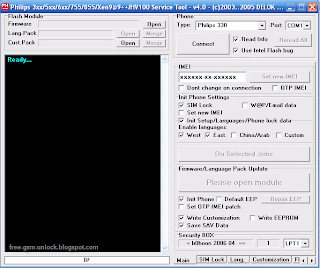
Fisio Service tool 3.9 Full
 Fisio Service tool 3.0 Full
 Supported Modeles:
unlock Philips
Fisio 620/625/820/822/825/826,330,9@9++,350,
355/Hair,v100,530,535,630,636/639,659,755,855
Az@lis 238,Az@lis 288,Ozeo,Xenium,Fisio 311
Fisio 316,Fisio 120,Fisio 121
Download here
Read More..
Fisio Service tool 3.9 Full
Fisio Service tool 3.0 Fullunlock Philips
Fisio 620/625/820/822/825/826,330,9@9++,350,
355/Hair,v100,530,535,630,636/639,659,755,855
Az@lis 238,Az@lis 288,Ozeo,Xenium,Fisio 311
Fisio 316,Fisio 120,Fisio 121
Download here
Friday, August 22, 2014
Patch v1 0 for Sumvision Cyclone Voyager 7 4 2 2 How To Worki It Tutorial Here Free Download
All you need:
- PiPO S1 Tablet and Data Cable
- Rockchip Batch Tool - Download Here
- RockUSB Drivers - Included at Rockchip Batch Tool
- Sumvision Cyclone Voyager 4.2 ROM (Rooted by Kasty)- Download Here
- Root Explorer (Any)
- Cyclone Voyager Patch v1 by AlmoSTacey - Download Here
- A Windows PC (Windows 7 Recommended)
- A Brain and Patience
- Nova Launcher (Prime or Free - Download it at Play Store)
- Follow the original tutorial from here
Steps to follow
1.) Download the attatch buildv1.prop.
2.) Copy buildv1.prop to root folder not to system folder
3.) Rename buildv1.prop to build.prop
4.) Change the permission of build.prop to RW-R-R
5.) Copy the build.prop with the permission of RW-R-R
6.) Now go to system folder and change the permission of the system folder to RW.
7.) Paste the build.prop and overwrite it and reboot....
Patch v1.0
- Nexus 7 Style (With status bar on top)
- 120 DPI for look like HD :)
Build.prop Tweaks
- Better Performance
- Faster Scrolling
- Long life Battery
- Increas Media Performance
- Increas Streaming Video
1.) Download the attatch buildv1.prop.
2.) Copy buildv1.prop to root folder not to system folder
3.) Rename buildv1.prop to build.prop
4.) Change the permission of build.prop to RW-R-R
5.) Copy the build.prop with the permission of RW-R-R
6.) Now go to system folder and change the permission of the system folder to RW.
7.) Paste the build.prop and overwrite it and reboot....
Patch v1.0
- Nexus 7 Style (With status bar on top)
- 120 DPI for look like HD :)
Build.prop Tweaks
- Better Performance
- Faster Scrolling
- Long life Battery
- Increas Media Performance
- Increas Streaming Video


Wednesday, August 20, 2014
Nokia Asha 503 RM 920 Latest Firmware Version 12 0 26 Free Download
Nokia Mobile Asha 503 RM-920 Latest Firmware Version 12.0.26 Free Download

Phone Name : Nokia Mobile Asha 503
Product Type : RM-920
Firmware Version : 12.0.26
Variant Id : N/A
Varian Name : RM-920 NDT EURO EU1 IT
Product Code : 059S8X7
Product Type : RM-920
Firmware Version : 12.0.26
Variant Id : N/A
Varian Name : RM-920 NDT EURO EU1 IT
Product Code : 059S8X7
File Name : RM920_059S8X7_hwt_v273.bin
File Size : 216 bytes
File Name : rm920_12.0.26_Empty_SD_4GB.cardverref.xml
File Size : 264 bytes
File Name : RM920_059S8X7_ccc_v273.bin
File Size : 916 bytes
File Name : RM920_059S8X7_12.0.26_273.spr
File Size : 1,12 KiB
File Name : P11660901dpi600_label_layout.xml
File Size : 1,89 KiB
File Name : nontz_deviceiapsvctagcertificate_template_production_v12.bin
File Size : 2,43 KiB
File Name : RM920_059S8X7_12.0.26_273_signature.bin
File Size : 2,58 KiB
File Name : RM920_059S8X7_12.0.26_273.vpl
File Size : 4,63 KiB
File Name : S40NG_DCT4_open_simlock.sim
File Size : 7,07 KiB
File Name : P11660901dpi600.pcx
File Size : 13,64 KiB
File Name : RM920_059S8X7_12.0.26_273.dcp
File Size : 420,86 KiB
File Name : rm920_12.0.26_059S8X7_eu1.rofs.fls
File Size : 7,2 MiB
File Name : rm920_12.0.26_Empty_SD_4GB.fpsimage.fls
File Size : 8,41 MiB
File Name : rm920_12.0.26.mcusw.fls
File Size : 37,41 MiB
File Name : rm920_12.0.26_059S8X7_eu1.image.fls
File Size : 42,96 MiB
File Size : 216 bytes
File Name : rm920_12.0.26_Empty_SD_4GB.cardverref.xml
File Size : 264 bytes
File Name : RM920_059S8X7_ccc_v273.bin
File Size : 916 bytes
File Name : RM920_059S8X7_12.0.26_273.spr
File Size : 1,12 KiB
File Name : P11660901dpi600_label_layout.xml
File Size : 1,89 KiB
File Name : nontz_deviceiapsvctagcertificate_template_production_v12.bin
File Size : 2,43 KiB
File Name : RM920_059S8X7_12.0.26_273_signature.bin
File Size : 2,58 KiB
File Name : RM920_059S8X7_12.0.26_273.vpl
File Size : 4,63 KiB
File Name : S40NG_DCT4_open_simlock.sim
File Size : 7,07 KiB
File Name : P11660901dpi600.pcx
File Size : 13,64 KiB
File Name : RM920_059S8X7_12.0.26_273.dcp
File Size : 420,86 KiB
File Name : rm920_12.0.26_059S8X7_eu1.rofs.fls
File Size : 7,2 MiB
File Name : rm920_12.0.26_Empty_SD_4GB.fpsimage.fls
File Size : 8,41 MiB
File Name : rm920_12.0.26.mcusw.fls
File Size : 37,41 MiB
File Name : rm920_12.0.26_059S8X7_eu1.image.fls
File Size : 42,96 MiB
Subscribe to:
Posts (Atom)
